
This is best Fabric, Power BI, SQL and AI community event. How do we know? The last event sold out! Save €200 with code FABCMTY200.
Register nowA new Data Days event is coming soon! This time we’re going bigger than ever. Fabric, Power BI, SQL, AI and more. Don't miss out.
Hello I have a set of dates that I want to add 1 years too, Here is the Dax
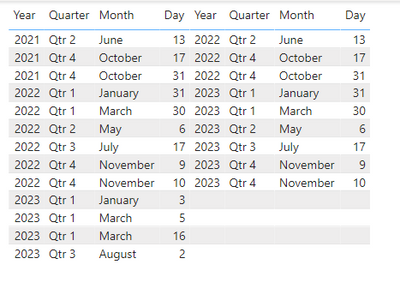
Iit works fine untill I get to 2023 See below
Any Ideas?
Solved! Go to Solution.
Hi @Anonymous ,
Agree with @edhans , please use EDATE() to add years.
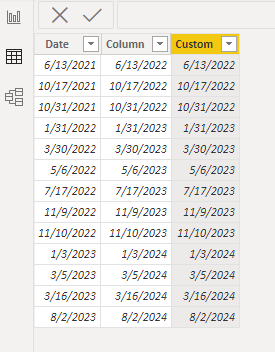
Or you could use Date.AddYears() to a custom column in Power Query:
Date.AddYears([Date],1)
And then change its type to Date. Below is the whole M syntax:
let
Source = Table.FromRows(Json.Document(Binary.Decompress(Binary.FromText("VczBDYAwDATBXvxGOp+tJFBL5P7bIEiA4+c8ducUUyM66BLHKyo4Cp0fDSxyuKYaemJsl5URVxH/zp9nwtF2sKdOmETc", BinaryEncoding.Base64), Compression.Deflate)), let _t = ((type nullable text) meta [Serialized.Text = true]) in type table [Date = _t]),
#"Changed Type" = Table.TransformColumnTypes(Source,{{"Date", type date}}),
#"Added Custom" = Table.AddColumn(#"Changed Type", "Custom", each Date.AddYears([Date],1)),
#"Changed Type1" = Table.TransformColumnTypes(#"Added Custom",{{"Custom", type date}})
in
#"Changed Type1"
Best Regards,
Eyelyn Qin
If this post helps, then please consider Accept it as the solution to help the other members find it more quickly.
Hi @Anonymous ,
Could you tell me if your problem has been solved? If it is, kindly Accept it as the solution. More people will benefit from it.
Best Regards,
Eyelyn Qin
Hi @Anonymous ,
Agree with @edhans , please use EDATE() to add years.
Or you could use Date.AddYears() to a custom column in Power Query:
Date.AddYears([Date],1)
And then change its type to Date. Below is the whole M syntax:
let
Source = Table.FromRows(Json.Document(Binary.Decompress(Binary.FromText("VczBDYAwDATBXvxGOp+tJFBL5P7bIEiA4+c8ducUUyM66BLHKyo4Cp0fDSxyuKYaemJsl5URVxH/zp9nwtF2sKdOmETc", BinaryEncoding.Base64), Compression.Deflate)), let _t = ((type nullable text) meta [Serialized.Text = true]) in type table [Date = _t]),
#"Changed Type" = Table.TransformColumnTypes(Source,{{"Date", type date}}),
#"Added Custom" = Table.AddColumn(#"Changed Type", "Custom", each Date.AddYears([Date],1)),
#"Changed Type1" = Table.TransformColumnTypes(#"Added Custom",{{"Custom", type date}})
in
#"Changed Type1"
Best Regards,
Eyelyn Qin
If this post helps, then please consider Accept it as the solution to help the other members find it more quickly.
Don't use DATEADD to add dates. This is a time intelligence function that creates a table of dates. To add days, just use +1 for one day. To add years, use the EDATE function.
DAX is for Analysis. Power Query is for Data Modeling
Proud to be a Super User!
MCSA: BI ReportingThanks so much for that, what formula could I use to add 2 years or more?
Just use increments of 12, So 12, 24, 36 for 1, 2, 3 years.
EDATE('Table'[Column1], 36)
would add 3 years.
See this article, as well as a bit of info on EOMONTH. EDATE – DAX Guide
Both might be helpful for you here.
DAX is for Analysis. Power Query is for Data Modeling
Proud to be a Super User!
MCSA: BI ReportingCheck out the May 2026 Power BI update to learn about new features.
Sign up to receive a private message when registration opens and key events begin.
If you have recently started exploring Fabric, we'd love to hear how it's going. Your feedback can help with product improvements.