cancel
Showing results for 
Search instead for 
Did you mean: 

Try your skills in the Power BI Dataviz World Championship! Round one ends June 26. Join now

Reply
Matic20
Frequent Visitor

Date and Time Difference

Hello  team 

I have there Columns, Status ( this includes things like pause, resume, close, create, postreply), TicketID(primary key ) and Log Status Creation( time for every status). I need to calculate forexample the Date $ time difference btn postreply and closeticket.

Please Advice 

Ticket IDLOG CREATION DATESTAFFEVENT NAME
165887/25/2019 19:22Emily  Spotpostinternalnote
165887/25/2019 19:22Emily  Spotcloseticket
165887/25/2019 19:22Emily  Spotpostinternalnote
165887/25/2019 19:22Emily  Spotpostreply
165887/25/2019 19:22Emily  Spotpostinternalnote
165887/25/2019 19:21Emily  Spotpostinternalnote
1 ACCEPTED SOLUTION

Hi @Matic20 ,

For your requirement, you could create the measure below.

difference =
VAR pauseticket =
    CALCULATE (
        MAX ( 'Table'[LOG CREATION DATE] ),
        FILTER ( 'Table', 'Table'[EVENT NAME] = "pauseticket" )
    )
VAR resumeticket =
    CALCULATE (
        MAX ( 'Table'[LOG CREATION DATE] ),
        FILTER ( 'Table', 'Table'[EVENT NAME] = "resumeticket" )
    )
VAR diff =
    DATEDIFF ( pauseticket, resumeticket, SECOND )
VAR hours =
    INT ( diff / 3600 )
VAR minutes =
    INT ( MOD ( diff - ( hours * 3600 ), 3600 ) / 60 )
RETURN
    hours & "hr" & minutes & "mints"

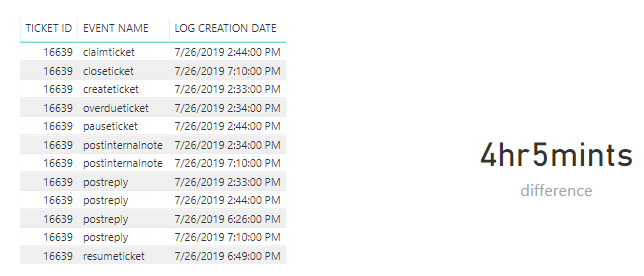
Here is the output.

Capture.PNG

Hope this can help you.

Best  Regards,

Cherry


Community Support Team _ Cherry Gao
If this post helps, then please consider Accept it as the solution to help the other members find it more quickly.

View solution in original post

5 REPLIES 5
v-piga-msft
Resident Rockstar
Resident Rockstar

Hi @Matic20 ,

Normally, we could use DATEIFF function to calculate the datetime difference.

I still have a little confused about your scenario.

If it is convenient, could you share your desired output so that we could help further on it.

Best  Regards,

Cherry


Community Support Team _ Cherry Gao
If this post helps, then please consider Accept it as the solution to help the other members find it more quickly.


@v-piga-msft wrote:

Hi @Matic20 ,

Normally, we could use DATEIFF function to calculate the datetime difference.

I still have a little confused about your scenario.

If it is convenient, could you share your desired output so that we could help further on it.

Best  Regards,

Cherry


Difference btn the eventname pauseticket and resumeticket (7/26/2019 18:49) and (7/26/2019 14:44) 

Result = 4hr and 5 mints

LOG CREATION DATEEVENT NAMETICKET ID
7/26/2019 19:10postinternalnote16639
7/26/2019 19:10closeticket16639
7/26/2019 19:10postreply16639
7/26/2019 18:49resumeticket16639
7/26/2019 18:26postreply16639
7/26/2019 14:44pauseticket16639
7/26/2019 14:44postreply16639
7/26/2019 14:44claimticket16639
7/26/2019 14:34postinternalnote16639
7/26/2019 14:34overdueticket16639
7/26/2019 14:34postinternalnote16639
7/26/2019 14:33postreply16639
7/26/2019 14:33createticket16639


Hi @Matic20 ,

For your requirement, you could create the measure below.

difference =
VAR pauseticket =
    CALCULATE (
        MAX ( 'Table'[LOG CREATION DATE] ),
        FILTER ( 'Table', 'Table'[EVENT NAME] = "pauseticket" )
    )
VAR resumeticket =
    CALCULATE (
        MAX ( 'Table'[LOG CREATION DATE] ),
        FILTER ( 'Table', 'Table'[EVENT NAME] = "resumeticket" )
    )
VAR diff =
    DATEDIFF ( pauseticket, resumeticket, SECOND )
VAR hours =
    INT ( diff / 3600 )
VAR minutes =
    INT ( MOD ( diff - ( hours * 3600 ), 3600 ) / 60 )
RETURN
    hours & "hr" & minutes & "mints"

Here is the output.

Capture.PNG

Hope this can help you.

Best  Regards,

Cherry


Community Support Team _ Cherry Gao
If this post helps, then please consider Accept it as the solution to help the other members find it more quickly.


@v-piga-msft wrote:

Hi @Matic20 ,

For your requirement, you could create the measure below.

difference =
VAR pauseticket =
    CALCULATE (
        MAX ( 'Table'[LOG CREATION DATE] ),
        FILTER ( 'Table', 'Table'[EVENT NAME] = "pauseticket" )
    )
VAR resumeticket =
    CALCULATE (
        MAX ( 'Table'[LOG CREATION DATE] ),
        FILTER ( 'Table', 'Table'[EVENT NAME] = "resumeticket" )
    )
VAR diff =
    DATEDIFF ( pauseticket, resumeticket, SECOND )
VAR hours =
    INT ( diff / 3600 )
VAR minutes =
    INT ( MOD ( diff - ( hours * 3600 ), 3600 ) / 60 )
RETURN
    hours & "hr" & minutes & "mints"

Here is the output.

Capture.PNG

Hope this can help you.

Best  Regards,

Cherry


Thank you so much, this really did help  

RobbeVL
Impactful Individual

Hi,


As @v-piga-msft mentioned, you can use DateDIFF in DAx (Not in Powerquery).
Or in PowerQuery you can simply create a custom column with :

[resumeticket] - [pauseticket]

If you want this in a different format, have a look here:
https://docs.microsoft.com/nl-nl/powerquery-m/duration-functions 

If you want more help, please let me know what exact datatype you want to have and in what format.

Robbe

Helpful resources

Announcements
Fabric Data Days is here Carousel

Fabric Data Days 2026

Don't miss out on Data Days, June 15 through August 7. Learn Fabric, Power BI, SQL, AI and more.

Power BI DataViz World Championships carousel

Power BI DataViz World Championships - June 2026

A new Power BI DataViz World Championship is coming this June! Don't miss out on submitting your entry.