Don't miss your chance to take exam DP-600 or DP-700 on us!
Request nowLearn from the best! Meet the four finalists headed to the FINALS of the Power BI Dataviz World Championships! Register now
Hello team
I have there Columns, Status ( this includes things like pause, resume, close, create, postreply), TicketID(primary key ) and Log Status Creation( time for every status). I need to calculate forexample the Date $ time difference btn postreply and closeticket.
Please Advice
| Ticket ID | LOG CREATION DATE | STAFF | EVENT NAME |
| 16588 | 7/25/2019 19:22 | Emily Spot | postinternalnote |
| 16588 | 7/25/2019 19:22 | Emily Spot | closeticket |
| 16588 | 7/25/2019 19:22 | Emily Spot | postinternalnote |
| 16588 | 7/25/2019 19:22 | Emily Spot | postreply |
| 16588 | 7/25/2019 19:22 | Emily Spot | postinternalnote |
| 16588 | 7/25/2019 19:21 | Emily Spot | postinternalnote |
Solved! Go to Solution.
Hi @Matic20 ,
For your requirement, you could create the measure below.
difference =
VAR pauseticket =
CALCULATE (
MAX ( 'Table'[LOG CREATION DATE] ),
FILTER ( 'Table', 'Table'[EVENT NAME] = "pauseticket" )
)
VAR resumeticket =
CALCULATE (
MAX ( 'Table'[LOG CREATION DATE] ),
FILTER ( 'Table', 'Table'[EVENT NAME] = "resumeticket" )
)
VAR diff =
DATEDIFF ( pauseticket, resumeticket, SECOND )
VAR hours =
INT ( diff / 3600 )
VAR minutes =
INT ( MOD ( diff - ( hours * 3600 ), 3600 ) / 60 )
RETURN
hours & "hr" & minutes & "mints"
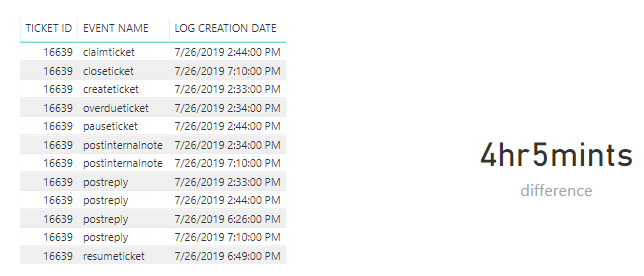
Here is the output.
Hope this can help you.
Best Regards,
Cherry
Hi @Matic20 ,
Normally, we could use DATEIFF function to calculate the datetime difference.
I still have a little confused about your scenario.
If it is convenient, could you share your desired output so that we could help further on it.
Best Regards,
Cherry
@v-piga-msft wrote:Hi @Matic20 ,
Normally, we could use DATEIFF function to calculate the datetime difference.
I still have a little confused about your scenario.
If it is convenient, could you share your desired output so that we could help further on it.
Best Regards,
Cherry
Difference btn the eventname pauseticket and resumeticket (7/26/2019 18:49) and (7/26/2019 14:44)
Result = 4hr and 5 mints
LOG CREATION DATE EVENT NAME TICKET ID 7/26/2019 19:10 postinternalnote 16639 7/26/2019 19:10 closeticket 16639 7/26/2019 19:10 postreply 16639 7/26/2019 18:49 resumeticket 16639 7/26/2019 18:26 postreply 16639 7/26/2019 14:44 pauseticket 16639 7/26/2019 14:44 postreply 16639 7/26/2019 14:44 claimticket 16639 7/26/2019 14:34 postinternalnote 16639 7/26/2019 14:34 overdueticket 16639 7/26/2019 14:34 postinternalnote 16639 7/26/2019 14:34 postinternalnote 16639 7/26/2019 14:33 postreply 16639 7/26/2019 14:33 createticket 16639
Hi @Matic20 ,
For your requirement, you could create the measure below.
difference =
VAR pauseticket =
CALCULATE (
MAX ( 'Table'[LOG CREATION DATE] ),
FILTER ( 'Table', 'Table'[EVENT NAME] = "pauseticket" )
)
VAR resumeticket =
CALCULATE (
MAX ( 'Table'[LOG CREATION DATE] ),
FILTER ( 'Table', 'Table'[EVENT NAME] = "resumeticket" )
)
VAR diff =
DATEDIFF ( pauseticket, resumeticket, SECOND )
VAR hours =
INT ( diff / 3600 )
VAR minutes =
INT ( MOD ( diff - ( hours * 3600 ), 3600 ) / 60 )
RETURN
hours & "hr" & minutes & "mints"
Here is the output.
Hope this can help you.
Best Regards,
Cherry
@v-piga-msft wrote:Hi @Matic20 ,
For your requirement, you could create the measure below.
difference = VAR pauseticket = CALCULATE ( MAX ( 'Table'[LOG CREATION DATE] ), FILTER ( 'Table', 'Table'[EVENT NAME] = "pauseticket" ) ) VAR resumeticket = CALCULATE ( MAX ( 'Table'[LOG CREATION DATE] ), FILTER ( 'Table', 'Table'[EVENT NAME] = "resumeticket" ) ) VAR diff = DATEDIFF ( pauseticket, resumeticket, SECOND ) VAR hours = INT ( diff / 3600 ) VAR minutes = INT ( MOD ( diff - ( hours * 3600 ), 3600 ) / 60 ) RETURN hours & "hr" & minutes & "mints"Here is the output.
Hope this can help you.
Best Regards,
Cherry
Thank you so much, this really did help
Hi,
As @v-piga-msft mentioned, you can use DateDIFF in DAx (Not in Powerquery).
Or in PowerQuery you can simply create a custom column with :
[resumeticket] - [pauseticket]
If you want this in a different format, have a look here:
https://docs.microsoft.com/nl-nl/powerquery-m/duration-functions
If you want more help, please let me know what exact datatype you want to have and in what format.
Robbe
Share feedback directly with Fabric product managers, participate in targeted research studies and influence the Fabric roadmap.
Check out the February 2026 Power BI update to learn about new features.