

Get certified for free when you join Fabric Data Days 2026 and dive into Fabric, Power BI, SQL, AI, and other essential data skills.
Join nowJuly 7 - July 17 | Round 2 of the Power BI Dataviz World Championships. Don't miss your chance! Learn more
Hi all,
Need some tips and explanation about how to do this.
I'm extracting data from several excel sheets (and multiple workbooks) :
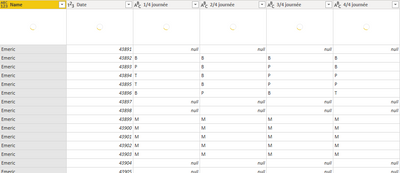
When i expand this column, i get somethink like this.
I'm
And this is what i'm expecting :
Thanks
Solved! Go to Solution.
Hi @Anonymous ,
We can try to add a custom column:
Table.PromoteHeaders(Table.Transpose([NameOfYourSecondColumn]), [PromoteAllScalars=true])
Then delete the old column and expand the new table column to meet your requirement.
Best regards,
Hi @Anonymous ,
We can try to add a custom column:
Table.PromoteHeaders(Table.Transpose([NameOfYourSecondColumn]), [PromoteAllScalars=true])
Then delete the old column and expand the new table column to meet your requirement.
Best regards,
For this one, some data transformation should be done before you expand all the Tables. That can be done with Combine & Edit or writing a custom function to do it. Transforming the data expanded as you've shown is probably doable but would be tricky. If you can post a link to the Excel sheet, we can propose the needed query (and function) to transform the tables before the append step.
If this works for you, please mark it as the solution. Kudos are appreciated too. Please let me know if not.
Regards,
Pat
To learn more about Power BI, follow me on Twitter or subscribe on YouTube.
Hi,
Try selecting first two columns, unpivot other columns, then select Date column and Pivot that one.
Make sense?
Kind regards,
Jeff
Join us in Barcelona for FabCon and SQLCon, the Fabric, Power BI, SQL, and AI community event. Save €200 with code FABCMTY200.
Join Data Days 2026: 60 days of free live/on-demand sessions, challenges, study groups, and certification opportunities.