

cancel
Showing results for 
Search instead for 
Did you mean: 

The Power BI Data Visualization World Championships is back! Get ahead of the game and start preparing now! Learn more

Reply
Anonymous
Not applicable

Data transormation

Hi all,

Need some tips and explanation about how to do this.


I'm extracting data from several excel sheets (and multiple workbooks) : 
Workbooks.PNG


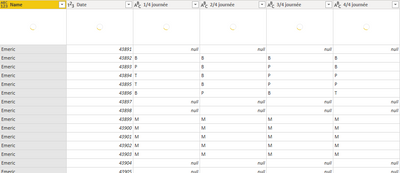
When i expand this column, i get somethink like this.


ExpandedWB.PNG


I'm 
And this is what i'm expecting : 

expected.PNG


Thanks

1 ACCEPTED SOLUTION
v-lid-msft
Community Support
Community Support

Hi @Anonymous ,


We can try to add a custom column:


Table.PromoteHeaders(Table.Transpose([NameOfYourSecondColumn]), [PromoteAllScalars=true])


Then delete the old column and expand the new table column to meet your requirement.


Best regards,


Community Support Team _ Dong Li
If this post helps, then please consider Accept it as the solution to help the other members find it more quickly.

View solution in original post

3 REPLIES 3
v-lid-msft
Community Support
Community Support

Hi @Anonymous ,


We can try to add a custom column:


Table.PromoteHeaders(Table.Transpose([NameOfYourSecondColumn]), [PromoteAllScalars=true])


Then delete the old column and expand the new table column to meet your requirement.


Best regards,


Community Support Team _ Dong Li
If this post helps, then please consider Accept it as the solution to help the other members find it more quickly.
mahoneypat
Microsoft Employee
Microsoft Employee

For this one, some data transformation should be done before you expand all the Tables.  That can be done with Combine & Edit or writing a custom function to do it.  Transforming the data expanded as you've shown is probably doable but would be tricky.  If you can post a link to the Excel sheet, we can propose the needed query (and function) to transform the tables before the append step.


If this works for you, please mark it as the solution.  Kudos are appreciated too.  Please let me know if not.

Regards,

Pat


Did I answer your question? Mark my post as a solution! Kudos are also appreciated!

To learn more about Power BI, follow me on Twitter or subscribe on YouTube.


@mahoneypa HoosierBI on YouTube


jnixon
Advocate II
Advocate II

Hi,


Try selecting first two columns, unpivot other columns, then select Date column and Pivot that one.


Make sense?


Kind regards,
Jeff

Helpful resources

Announcements
Power BI DataViz World Championships

Power BI Dataviz World Championships

The Power BI Data Visualization World Championships is back! Get ahead of the game and start preparing now!

December 2025 Power BI Update Carousel

Power BI Monthly Update - December 2025

Check out the December 2025 Power BI Holiday Recap!

FabCon Atlanta 2026 carousel

FabCon Atlanta 2026

Join us at FabCon Atlanta, March 16-20, for the ultimate Fabric, Power BI, AI and SQL community-led event. Save $200 with code FABCOMM.

Top Solution Authors