Join us at FabCon Atlanta from March 16 - 20, 2026, for the ultimate Fabric, Power BI, AI and SQL community-led event. Save $200 with code FABCOMM.
Register now!Learn from the best! Meet the four finalists headed to the FINALS of the Power BI Dataviz World Championships! Register now
Hi everyone,
Before explaining the issue, please let me tell what I'm working on and what is the current system setup looks like.
I'd like to create Power BI reports from an SQL database and embed the visuals into a Sharepoint page.
1. I have an SQL Server database on a VM within my company.
2. An On-Premise Data Gateway is installed on this VM and I can reach the required data with Power BI Desktop (I'm using DirectQuery connection)
3. This part is working well, if I add new records to the database, the reports in the desktop versions get updated.
+ I subscribed to the trial version of Power BI Pro.
Problem comes when I try to publish the desktop report to powerbi.com so that I can then embed it into Sharepoint.
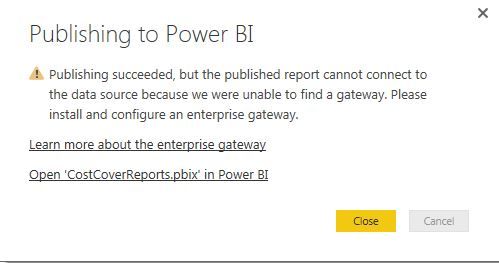
Power BI Desktop says after clicking on Publish:
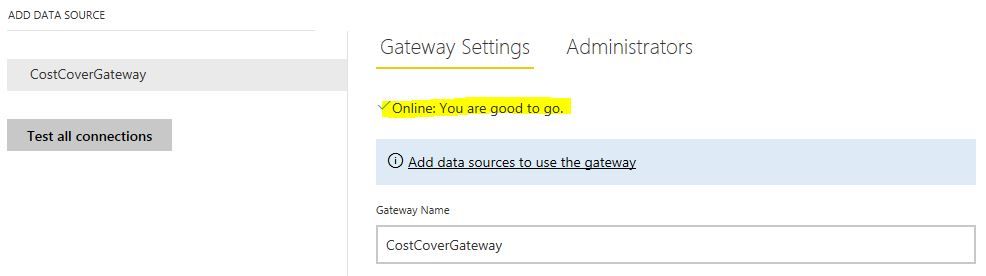
Although I have the necessary gateway set up:
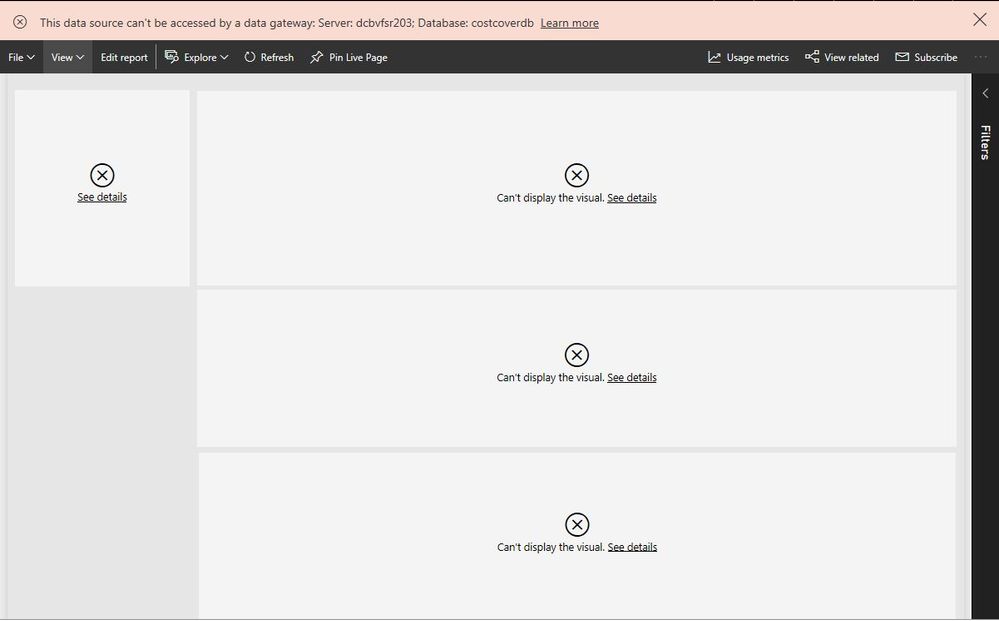
I can actually see the report online but like this:
Any suggestions how to tackle this?
Cheers,
Tamás
Solved! Go to Solution.
@GellaiTamas,
Based on your screenshots, you haven't added the SQL Server database within the gateway. Please follow the instructions in this article to add your SQL data source under the gateway.
Regards,
Lydia
@GellaiTamas,
Based on your screenshots, you haven't added the SQL Server database within the gateway. Please follow the instructions in this article to add your SQL data source under the gateway.
Regards,
Lydia
Thank you very much, @Anonymous, it works now. I've tried this before but kept getting error messages. Now I know why: I'm working from home and remote access gateway was not set up...
@GellaiTamas First check, make sure the connection strings match exactly. Second, you can check the gateway log files to see if there is a more specific error in them. Here is a link to the troubleshooting guide.
Installer logs
%localappdata%\Temp\On-premises_data_gateway_*.log
Configuration logs
%localappdata%\Microsoft\on-premises data gateway\GatewayConfigurator*.log
On-premises data gateway service logs
C:\Users\PBIEgwService\AppData\Local\Microsoft\on-premises data gateway\Gateway*.log
Thanks, @Anonymous, very useful info!
Share feedback directly with Fabric product managers, participate in targeted research studies and influence the Fabric roadmap.
Check out the February 2026 Power BI update to learn about new features.
| User | Count |
|---|---|
| 16 | |
| 12 | |
| 9 | |
| 6 | |
| 6 |