Learn from the best! Meet the four finalists headed to the FINALS of the Power BI Dataviz World Championships! Register now
Hi Community,
I have in Power Bi a table that has fields that contains lists.
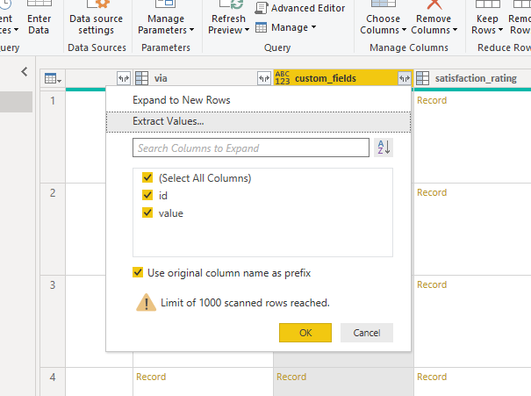
To see the values in the table, I go to Edit Queries and open the Power Query. In the relevant column I click on "Expand to New Rows".
Then the name "List" changed to "Record", so I again click on "Expand to New Rows".
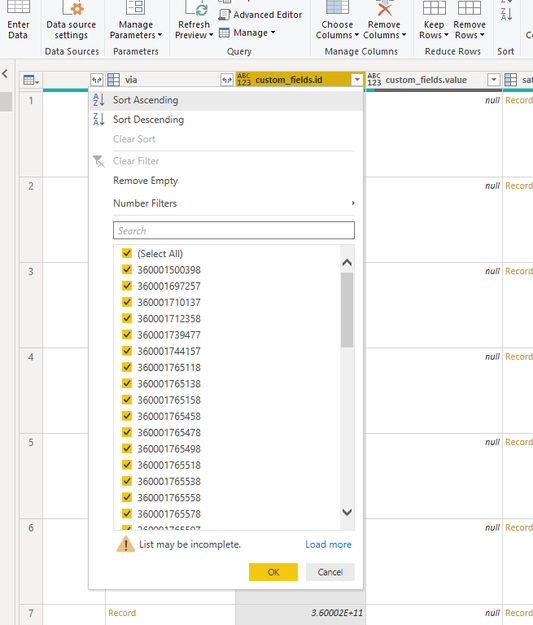
After that I expect to see the columns with the values. The values are shown in the column filter:
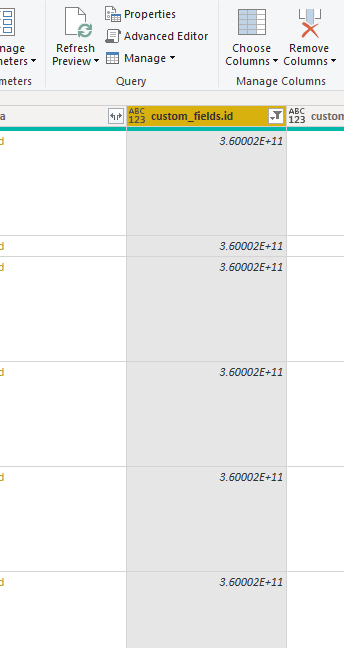
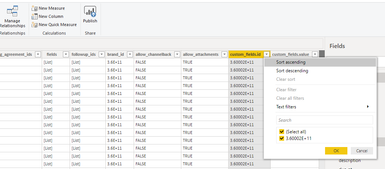
But in the column is shown a unique value (3.60002E+11)
When applying the changes to Power BI, the only value that is shown is 3.60002E+11, in the column and also in the filter
So all the data is lost.
This happens in several different columns.
What am I missing? How can I work with the original values?
Thanks!!
Solved! Go to Solution.
You haven't got the correct data type on the column.
It is set as the 'any' type and when it gets brought into powerbi, the data is treated like text so the scientific notation is shown in powerbi.
Experiment in Power Query with 'whole number', or 'decimal'
If none of them work, just bring the original field e.g, 36003466347734 through as text and change it in power bi front end
You haven't got the correct data type on the column.
It is set as the 'any' type and when it gets brought into powerbi, the data is treated like text so the scientific notation is shown in powerbi.
Experiment in Power Query with 'whole number', or 'decimal'
If none of them work, just bring the original field e.g, 36003466347734 through as text and change it in power bi front end
Worked!
Thanks!
| User | Count |
|---|---|
| 15 | |
| 8 | |
| 6 | |
| 5 | |
| 5 |