cancel
Showing results for 
Search instead for 
Did you mean: 

We've captured the moments from FabCon & SQLCon that everyone is talking about, and we are bringing them to the community, live and on-demand. Starts on April 14th. Register now

Reply
Anonymous
Not applicable

Data lost between Power Query and Power BI

Hi Community, 

I have in Power Bi a table that has fields that contains lists.

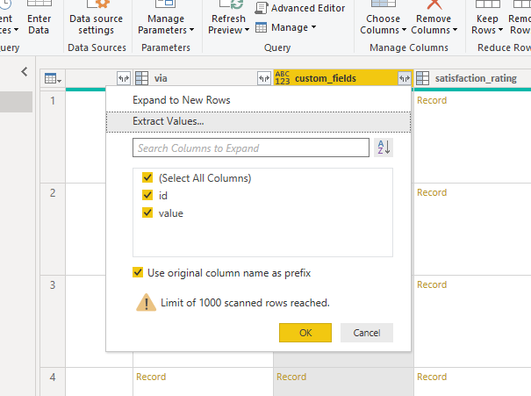
To see the values in the table, I go to Edit Queries and open the Power Query. In the relevant column I click on "Expand to New Rows".

1.png

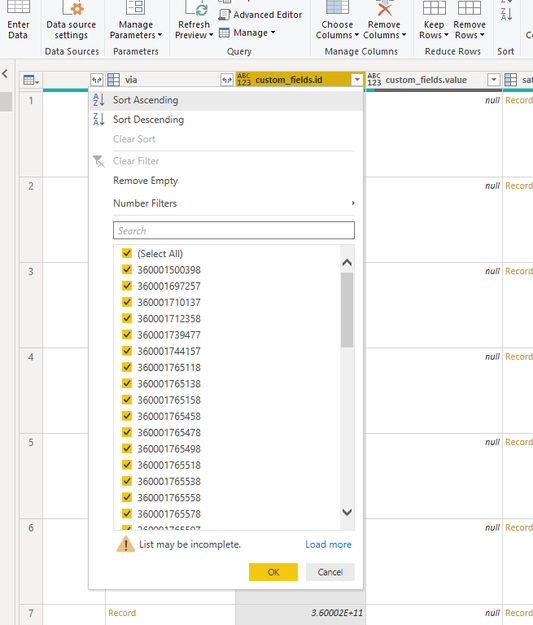
Then the name "List" changed to "Record", so I again click on "Expand to New Rows".

2.png

After that I expect to see the columns with the values. The values are shown in the column filter:

3.png

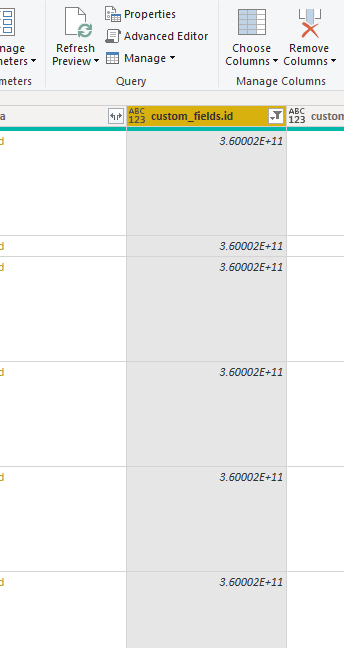
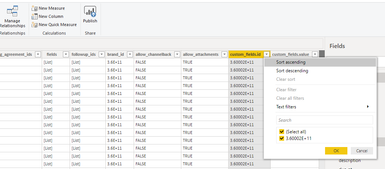
But in the column is shown a unique value (3.60002E+11)

4.png

When applying the changes to Power BI, the only value that is shown is 3.60002E+11, in the column and also in the filter

5.png

6.png

So all the data is lost.

This happens in several different columns.

What am I missing? How can I work with the original values?

Thanks!!

1 ACCEPTED SOLUTION
HotChilli
Community Champion
Community Champion

You haven't got the correct data type on the column.

It is set as the 'any' type and when it gets brought into powerbi, the data is treated like text so the scientific notation is shown in powerbi.


Experiment in Power Query with 'whole number', or 'decimal'

If none of them work, just bring the original field e.g, 36003466347734 through as text and change it in power bi front end

View solution in original post

2 REPLIES 2
HotChilli
Community Champion
Community Champion

You haven't got the correct data type on the column.

It is set as the 'any' type and when it gets brought into powerbi, the data is treated like text so the scientific notation is shown in powerbi.


Experiment in Power Query with 'whole number', or 'decimal'

If none of them work, just bring the original field e.g, 36003466347734 through as text and change it in power bi front end

Anonymous
Not applicable

Worked!

Thanks!

Helpful resources

Announcements
New to Fabric survey Carousel

New to Fabric Survey

If you have recently started exploring Fabric, we'd love to hear how it's going. Your feedback can help with product improvements.

Power BI DataViz World Championships carousel

Power BI DataViz World Championships - June 2026

A new Power BI DataViz World Championship is coming this June! Don't miss out on submitting your entry.

Join our Fabric User Panel

Join our Fabric User Panel

Share feedback directly with Fabric product managers, participate in targeted research studies and influence the Fabric roadmap.

March Power BI Update Carousel

Power BI Community Update - March 2026

Check out the March 2026 Power BI update to learn about new features.