Share feedback directly with Fabric product managers, participate in targeted research studies and influence the Fabric roadmap.
Sign up nowGet Fabric certified for FREE! Don't miss your chance! Learn more
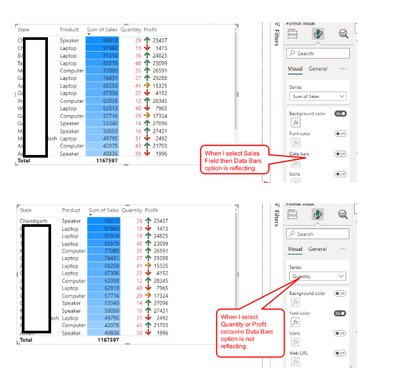
Hi All, I was trying to apply Data Bar to my Sales, Profit or Quantity Column . When I select SALES column then I am getting the option DATA BAR however when I select the PROFIT OR QUANTITY column then I don't get the option to apply DATA BARS for those columns. Attachment is mention below. Please Help.
Solved! Go to Solution.
Hi @DeeapkBI
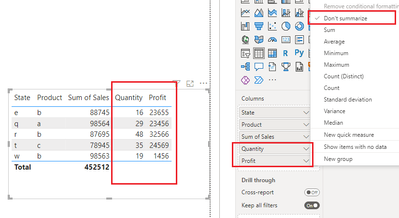
Please check if you have selected "Don't summarize" for Quantity and Profit columns. With "Don't summarize", they will not show "Data bars" option. Instead, select "Sum" aggregation type for them, then "Data bars" option will appear.
Best Regards,
Community Support Team _ Jing
If this post helps, please Accept it as Solution to help other members find it. Highly appreciate your Kudos!
Hi @DeeapkBI
Please check if you have selected "Don't summarize" for Quantity and Profit columns. With "Don't summarize", they will not show "Data bars" option. Instead, select "Sum" aggregation type for them, then "Data bars" option will appear.
Best Regards,
Community Support Team _ Jing
If this post helps, please Accept it as Solution to help other members find it. Highly appreciate your Kudos!
Please provide sample data that covers your issue or question completely.
https://community.powerbi.com/t5/Community-Blog/How-to-provide-sample-data-in-the-Power-BI-Forum/ba-...
Please show the expected outcome based on the sample data you provided.
https://community.powerbi.com/t5/Desktop/How-to-Get-Your-Question-Answered-Quickly/m-p/1447523
If you love stickers, then you will definitely want to check out our Community Sticker Challenge!
Check out the January 2026 Power BI update to learn about new features.
| User | Count |
|---|---|
| 7 | |
| 5 | |
| 4 | |
| 3 | |
| 3 |
| User | Count |
|---|---|
| 13 | |
| 11 | |
| 11 | |
| 8 | |
| 6 |