cancel
Showing results for 
Search instead for 
Did you mean: 

Data Days is here! Join us now for 60+ days of learning, challenges, and connection. Learn more

Reply
QS7
Frequent Visitor

Data Preview - Memory Issue

Hi everyone,

We are currently encountering an issue with the data preview of Power Query.

The issue is that each time that i click on the request to change the Power Query, the data preview is starting, when i add filters on my data source ( SAP HANA ), a preview is starting, etc ...
This is fine as long as the request are not heavy, but some of our request use a lot of memory and navigating through the Power Query editor is enough to start 4/5 previews that use all the available memory in HANA.


-> I tried to disable those preview, it seems that it is not possible yet 

Does someone know how to deal with this issue ?

Thanks.

3 REPLIES 3
edhans
Community Champion
Community Champion

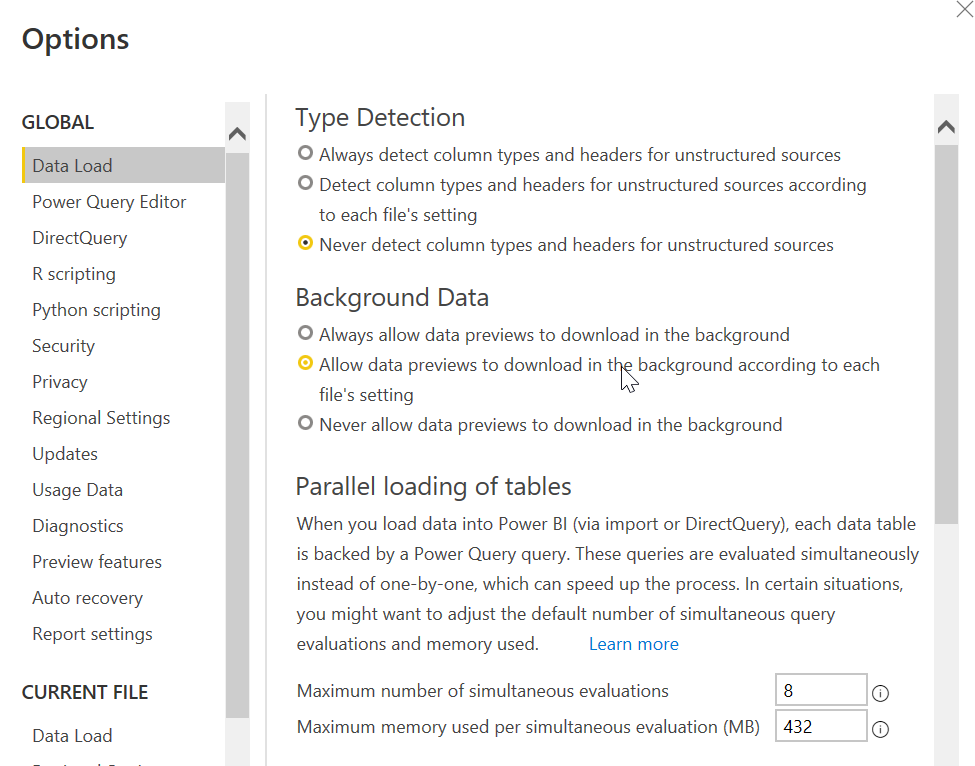
Have you tried changing the data load settings? Shown are the global settings. You might also need to tweak the local settings for that file. Global settings are in effect for new files, or if that particular setting doesn't exist in the Local settings area.


2022-09-20 16_11_06-Options.png


Did I answer your question? Mark my post as a solution!
Did my answers help arrive at a solution? Give it a kudos by clicking the Thumbs Up!

DAX is for Analysis. Power Query is for Data Modeling


Proud to be a Super User!

MCSA: BI Reporting
QS7
Frequent Visitor

Hi edhans,

If i'm not mistaken this option just means that the preview will be processed when i select a query or a step in the Power Query Editor instead of being processed for all of them in background.

My issue is that i need to stop any kind of preview because otherwise during the modification of the Power Query the previews requests are send to our database ( And not killed when we swap between the steps ), and this is consuming all the available memory.

edhans
Community Champion
Community Champion

You cannot stop the preview. If you click on it, it will preview. If you want to code with no preview, copy the existing code to NotePad++ and work from there, then paste it back.

Or get a copy of the database (limited copy with just the necessary tables) and put it in a DEV environment. This is one of the purposes of a dev environment. You could even replicate the tables to a Dataflow, work from those, then change the connector later to go back to the SAP database when done.


Did I answer your question? Mark my post as a solution!
Did my answers help arrive at a solution? Give it a kudos by clicking the Thumbs Up!

DAX is for Analysis. Power Query is for Data Modeling


Proud to be a Super User!

MCSA: BI Reporting

Helpful resources

Announcements
Fabric Data Days is here Carousel

Fabric Data Days 2026

Don't miss out on Data Days, June 15 through August 7. Learn Fabric, Power BI, SQL, AI and more.

May Power BI Update Carousel

Power BI Monthly Update - May 2026

Check out the May 2026 Power BI update to learn about new features.

Power BI DataViz World Championships carousel

Power BI DataViz World Championships - June 2026

A new Power BI DataViz World Championship is coming this June! Don't miss out on submitting your entry.