cancel
Showing results for 
Search instead for 
Did you mean: 

July 7 - July 17 | Round 2 of the Power BI Dataviz World Championships. Don't miss your chance! Learn more

Reply
Anonymous
Not applicable

Data Flow - PowerQuery Error - Evaluation resulted in a stack overflow and cannot continue

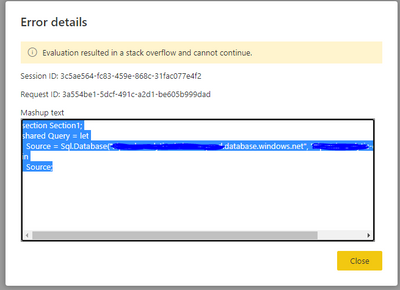
I am trying to create a DataFlow for a 2.6GB fact table and I am getting this error:


JeridInsight_0-1616786265473.png


This is on a P3 node, so you would think that the capacity is not an issue.  Any ideas?  Can a diagnose this myself or do I need the PBI Admin? 


Thanks!

1 ACCEPTED SOLUTION
Anonymous
Not applicable

Strangely, putting in an explicit "SELECT *" SQL source query worked instead of choosing the view object from the PowerQuery interface.   Don't know why, but it fixed my issue. 

Side question.  We are trying to reduce load on the DW by creating base Data Flows that other workspaces can base their own Data Flows off of.  This should limit every single dataset from query redundant data from the DW.   It also puts the files in ADLS which opens the data up for other uses-cases like ML or Databricks.  

View solution in original post

4 REPLIES 4
snehamishra
New Member

I am trying to connect my dashboard to fetch data connected to kobotool box. It was happening earlier but now says stack overflow while the web address is same.

lbendlin
Super User
Super User

You will want to do performance comparisons.  I don't think dataflows will gain you anything in that particular scenario.

Anonymous
Not applicable

Strangely, putting in an explicit "SELECT *" SQL source query worked instead of choosing the view object from the PowerQuery interface.   Don't know why, but it fixed my issue. 

Side question.  We are trying to reduce load on the DW by creating base Data Flows that other workspaces can base their own Data Flows off of.  This should limit every single dataset from query redundant data from the DW.   It also puts the files in ADLS which opens the data up for other uses-cases like ML or Databricks.  

lbendlin
Super User
Super User

can you try with a different table from that same Azure SQL database?


Side question - Why do you want to stuff data that is already in Azure into yet another Azure data storage (dataflows)?

Helpful resources

Announcements
FabCon and SQLCon Barcelona 2026

FabCon & SQLCon – Barcelona 2026

Join us in Barcelona for FabCon and SQLCon, the Fabric, Power BI, SQL, and AI community event. Save €200 with code FABCMTY200.

60 days of Data Days Carousel

Data Days 2026

Join Fabric Data Days 2026: 60 days of free live/on-demand sessions, challenges, study groups, and certification opportunities.

Power BI DataViz World Championships carousel

Power BI DataViz World Championships - June 2026

A new Power BI DataViz World Championship is coming this June! Don't miss out on submitting your entry.