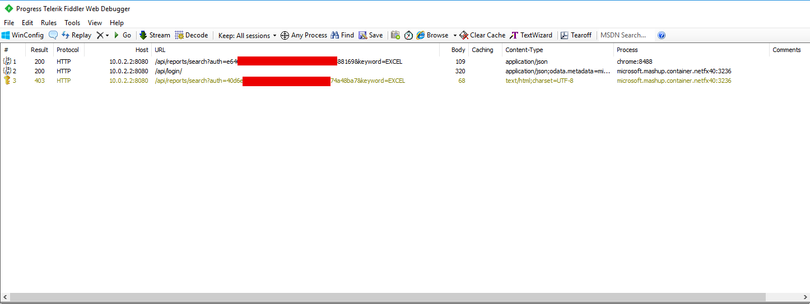
When I make this report search request via chrome I get JSON back and when I make the request in my Power BI data connector I get back HTML. The error I get is "Invalid credential" but I can see the data connector login via the server log. even if I just grab the path from Fiddler and drop it into Chrome I get json back. Why would the Power BI Data Connector query bring back HTML?
here's the query:
section SynDNA;

[DataSource.Kind="SynDNA", Publish="SynDNA.Publish"]
shared SynDNA.Feed = Value.ReplaceType(SynDNAImpl, type function (url as Uri.Type) as any);

SynDNAImpl = (url as text) =>

    let
        Credential = Extension.CurrentCredential(),

        CredentialConnectionString = [ UID = Credential[Username], PWD = Credential[Password] ],

        login = Record.ToTable(Json.Document(Web.Contents(url & "/api/login/" & CredentialConnectionString[UID] & "/" & CredentialConnectionString[PWD], [ Headers = DefaultRequestHeaders ]))),
        FilterLogin = Table.SelectRows(login, each _[Name] = "hash" ),
        hash = List.First(Table.Column(FilterLogin, "Value")),
        source = Web.Contents(url & "/api/reports/search?auth=" & hash & "&keyword=EXCEL", [ Headers = DefaultRequestHeaders ]),
       source = Web.Contents(dump, [ Headers = DefaultRequestHeaders ]),
       json = Json.Document(source)

    in
        json;


    DefaultRequestHeaders = [
   // #"Content-Type" = "application/json;odata.metadata=minimal",
    #"Accept" = "application/json;odata.metadata=minimal",  // column name and values only
    #"OData-MaxVersion" = "4.0"                             // we only support v4
];

// Data Source Kind description
SynDNA = [
    Authentication = [
         UsernamePassword = []

    ],
It's supposed to bring back a list of reports that have the keyword "EXCEL" attached.
Any help would be appreciated.


