Join us at FabCon Atlanta from March 16 - 20, 2026, for the ultimate Fabric, Power BI, AI and SQL community-led event. Save $200 with code FABCOMM.
Register now!The Power BI Data Visualization World Championships is back! Get ahead of the game and start preparing now! Learn more
Hi All,
I'm currently using Baidu maps distance lite API to estimate the shortest travel time for each Origin to Destination, where the Origin and Destination will change dynamically.
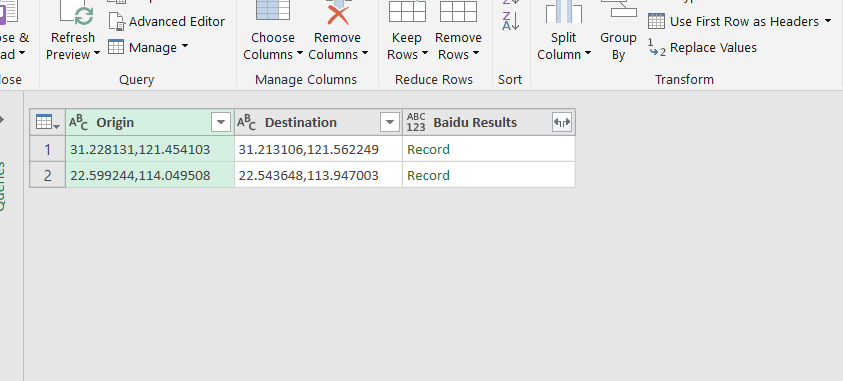
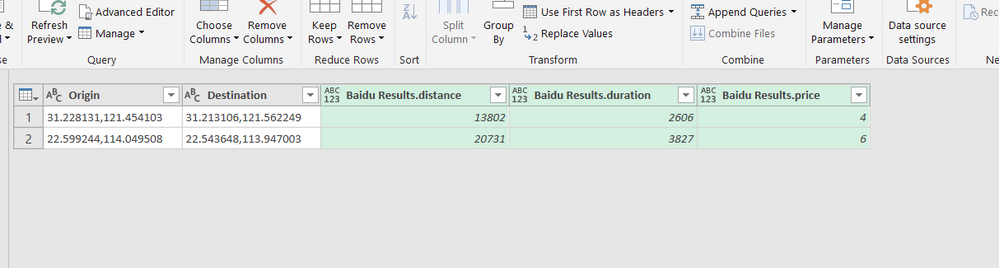
I am trying to achieve as per the screenshot below when one adds column by "Invoke Custom Function" to the source table.
From this:
To this:
the current m code that i have is :
(Origin as text, Destination as text) =>
let
Baidu_API_key = "XXXX",
Source = Json.Document(Web.Contents("http://api.map.baidu.com/directionlite/v1/transit?origin="&Origin&"&destination="&Destination&"&ak="&Baidu_API_key)),
#"Results" = Table.ExpandRecordColumn(Table.FromList(Record.ToList(Record.SelectFields(Source,"result")),Splitter.SplitByNothing(),null,null,ExtraValues.Error),"Column1", {"origin", "destination", "routes", "taxi"}),
#"Routes" = Table.ExpandListColumn(Table.SelectColumns(#"Results","routes"),"routes"),
#"Shortest travel" = Table.ExpandRecordColumn(#"Routes", "routes", {"distance", "duration", "price"}),
#"results in a row" = Table.Min(#"Shortest travel", "duration")
in
#"results in a row"Appreciate if any kind folks can advise which functions should I use to achieve the above.
Thanks in advance.
Hi @slackerhx,
in pseudocode it should be as follows. I hope I have no typos in code.
let
Source = <YOUR PREVIOUS STEPS>,
BaiduResult = Table.AddColumn(Source, "Baidu Result", each yourFunctionName([Origin], [Destinantion])),
Result = Table.ExpandRecordColumn(BaiduResult, "Baidu Result", {"distance", "duration", "price"})
in
Result
Hi @Nolock,
I've tried your suggested method but i got the following error:
Expression.Error: We cannot convert a value of type Record to type Table.
Details:
Value=Record
Type=Type
I've tried to modify the code to
(Origin as text, Destination as text) =>
let
Baidu_API_key = "XXXX",
Source = Json.Document(Web.Contents("http://api.map.baidu.com/directionlite/v1/transit?origin="&Origin&"&destination="&Destination&"&ak="&Baidu_API_key)),
BaiduResult = Table.AddColumn(Record.ToTable(Source), "Baidu Result", each Custom([Origin], [Destination])),
Result = Table.ExpandRecordColumn(BaiduResult, "Baidu Result", {"distance", "duration", "price"})
in
Resultbut i got the following error instead:
Expression.Error: The field 'Origin' of the record wasn't found.
Details:
Name=status
Value=0
Hi @slackerhx,
you've understand me wrong.
Unfortunately I can't prepare a 100 % working solution for you because I don't have any APIkey for Baidu for testing, but I hope you'll see my point in the following code.
let
Source = <YOUR TABLE WITH COLUMNS ORIGIN AND DESTINATION>,
// your function getting the distance (you can also remove it from this expression and place somewhere else as separated query)
fnCalculateDistance = (Origin as text, Destination as text) as table =>
let
Baidu_API_key = "XXXX",
Source = Json.Document(Web.Contents("http://api.map.baidu.com/directionlite/v1/transit?origin="&Origin&"&destination="&Destination&"&ak="&Baidu_API_key)),
#"Results" = Table.ExpandRecordColumn(Table.FromList(Record.ToList(Record.SelectFields(Source,"result")),Splitter.SplitByNothing(),null,null,ExtraValues.Error),"Column1", {"origin", "destination", "routes", "taxi"}),
#"Routes" = Table.ExpandListColumn(Table.SelectColumns(#"Results","routes"),"routes"),
#"Shortest travel" = Table.ExpandRecordColumn(#"Routes", "routes", {"distance", "duration", "price"}),
#"results in a row" = Table.Min(#"Shortest travel", "duration")
in
#"results in a row",
// add a column to Source where every row contains the result of fnCalculateDistance (the result is a table with one row)
BaiduResult = Table.AddColumn(Source, "Baidu Result", each fnCalculateDistance([Origin], [Destinantion])),
// expand the new table into 3 columns
Result = Table.ExpandRecordColumn(BaiduResult, "Baidu Result", {"distance", "duration", "price"})
in
Result
I'm not sure what I got wrong as I tried inputing what you've written above but i'm still getting errors:
let
Source = Excel.CurrentWorkbook(){[Name="Table2"]}[Content],
fnCalculateDistance = (Origin as text, Destination as text) as table =>
let
Baidu_API_key = "XXXXXXX",
Source = Json.Document(Web.Contents("http://api.map.baidu.com/directionlite/v1/transit?origin="&Origin&"&destination="&Destination&"&ak="&Baidu_API_key)),
#"Results" = Table.ExpandRecordColumn(Table.FromList(Record.ToList(Record.SelectFields(Source,"result")),Splitter.SplitByNothing(),null,null,ExtraValues.Error),"Column1", {"origin", "destination", "routes", "taxi"}),
#"Routes" = Table.ExpandListColumn(Table.SelectColumns(#"Results","routes"),"routes"),
#"Shortest travel" = Table.ExpandRecordColumn(#"Routes", "routes", {"distance", "duration", "price"}),
#"results in a row" = Table.Min(#"Shortest travel", "duration")
in
#"results in a row",
BaiduResult = Table.AddColumn(Source, "Baidu Result", each fnCalculateDistance([Origin], [Destination])),
Result = Table.ExpandRecordColumn(BaiduResult, "Baidu Result", {"distance", "duration", "price"})
in
ResultHi @slackerhx,
I've read the whole code once again but unfortunately I haven't seen any obvious problem. Please test all the parts of the code separately - that's the only way.
let
Source = Excel.CurrentWorkbook(){[Name="Table2"]}[Content]
in
SourceThen the function.
(Origin as text, Destination as text) as table =>
let
Baidu_API_key = "XXXXXXX",
Source = Json.Document(Web.Contents("http://api.map.baidu.com/directionlite/v1/transit?origin="&Origin&"&destination="&Destination&"&ak="&Baidu_API_key)),
#"Results" = Table.ExpandRecordColumn(Table.FromList(Record.ToList(Record.SelectFields(Source,"result")),Splitter.SplitByNothing(),null,null,ExtraValues.Error),"Column1", {"origin", "destination", "routes", "taxi"}),
#"Routes" = Table.ExpandListColumn(Table.SelectColumns(#"Results","routes"),"routes"),
#"Shortest travel" = Table.ExpandRecordColumn(#"Routes", "routes", {"distance", "duration", "price"}),
#"results in a row" = Table.Min(#"Shortest travel", "duration")
in
#"results in a row"And so on.
The Power BI Data Visualization World Championships is back! Get ahead of the game and start preparing now!
Check out the November 2025 Power BI update to learn about new features.