Don't miss your chance to take exam DP-600 or DP-700 on us!
Request nowLearn from the best! Meet the four finalists headed to the FINALS of the Power BI Dataviz World Championships! Register now
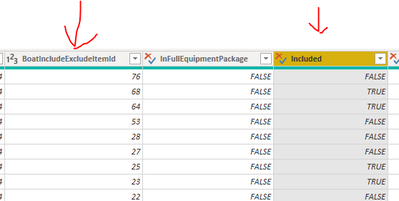
Hi, I have 2 columns that look like this
Now I want to create a custom column that shows "TRUE" when
ID=68 and
Included = TRUE
How do write this in Power Query?
Solved! Go to Solution.
This should work
= if [BoatIncludeExcludeId] = 68 and [InFulllEquipmentPackage] = true then true else false
Regards,
Pat
To learn more about Power BI, follow me on Twitter or subscribe on YouTube.
Hi @Anonymous ,
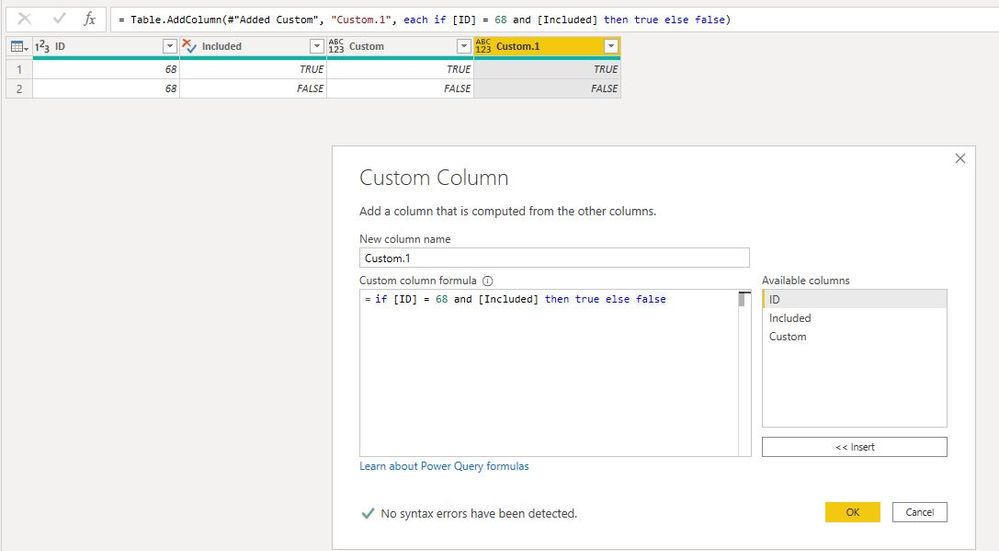
You can also create a custom column like so:
= if [ID] = 68 and [Included] then true else false
Best Regards,
Icey
If this post helps, then please consider Accept it as the solution to help the other members find it more quickly.
clike Add Column ---> Custom Column, and input this formula
= [BoatIncludeExcludeItemId] = 68 and [Included]
Hi @Anonymous ,
You can also create a custom column like so:
= if [ID] = 68 and [Included] then true else false
Best Regards,
Icey
If this post helps, then please consider Accept it as the solution to help the other members find it more quickly.
This should work
= if [BoatIncludeExcludeId] = 68 and [InFulllEquipmentPackage] = true then true else false
Regards,
Pat
To learn more about Power BI, follow me on Twitter or subscribe on YouTube.
Share feedback directly with Fabric product managers, participate in targeted research studies and influence the Fabric roadmap.
Check out the February 2026 Power BI update to learn about new features.