This is best Fabric, Power BI, SQL and AI community event. How do we know? The last event sold out! Save €200 with code FABCMTY200.
Register nowThe Fabric community is upgrading! Read all of the details including the timeline and what you can expect. Learn more
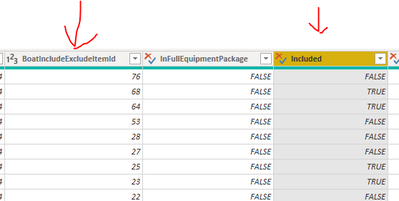
Hi, I have 2 columns that look like this
Now I want to create a custom column that shows "TRUE" when
ID=68 and
Included = TRUE
How do write this in Power Query?
Solved! Go to Solution.
This should work
= if [BoatIncludeExcludeId] = 68 and [InFulllEquipmentPackage] = true then true else false
Regards,
Pat
To learn more about Power BI, follow me on Twitter or subscribe on YouTube.
Hi @Anonymous ,
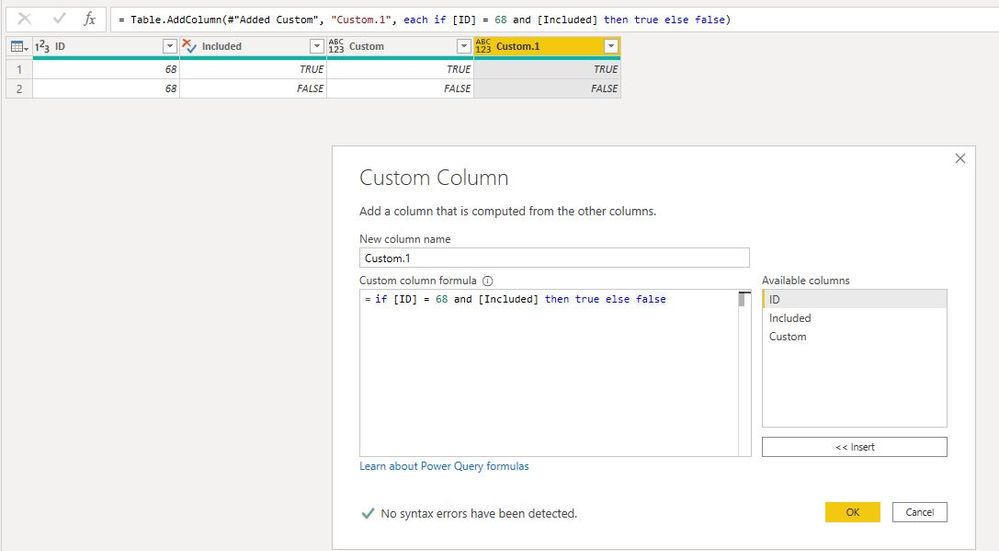
You can also create a custom column like so:
= if [ID] = 68 and [Included] then true else false
Best Regards,
Icey
If this post helps, then please consider Accept it as the solution to help the other members find it more quickly.
clike Add Column ---> Custom Column, and input this formula
= [BoatIncludeExcludeItemId] = 68 and [Included]
Hi @Anonymous ,
You can also create a custom column like so:
= if [ID] = 68 and [Included] then true else false
Best Regards,
Icey
If this post helps, then please consider Accept it as the solution to help the other members find it more quickly.
This should work
= if [BoatIncludeExcludeId] = 68 and [InFulllEquipmentPackage] = true then true else false
Regards,
Pat
To learn more about Power BI, follow me on Twitter or subscribe on YouTube.
Join us in Barcelona for FabCon and SQLCon, the Fabric, Power BI, SQL, and AI community event. Save €200 with code FABCMTY200.