Get certified for free when you join Fabric Data Days 2026 and dive into Fabric, Power BI, SQL, AI, and other essential data skills.
Join nowData Days is here! Join us now for 60+ days of learning, challenges, and connection. Learn more
Hi All,
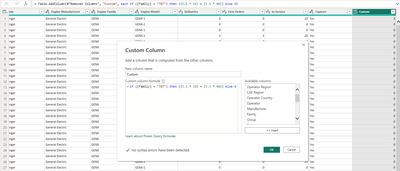
I am trying to create custom column and the desired result is = from my column 'Family' if the value is 787 then custom column should calculate (5.5*16)+(5.5*40) = it should show the calculation result and if not result 0, however I am not able to get the output by this :
([Family] = "787") * ((5.5 * 16) + (5.5 * 40)), it returns with error, can you please help.
Solved! Go to Solution.
As I wrote and suspected, your 787 appears to be a number. Change your if statement so that you are comparing to the number 787 and not to the text string 787.
Thank you for the reply, I did try the above formula, however value returns with 0 instead of showing the calculated result
I want the end result of calculation which (5.5*16) + (5.5*40) = calculated value in the custom column
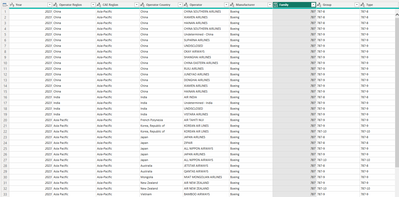
You do not show the family column in your example. My guess is that the data type in that column is number or whole number. You are checking in your logical statement if it is a text representation of a number. Hence the logical statement will return false. Power query is very aware of data types. Text does not equal number.
Thank you. this is my data type:
My requirement is if family column returns with 787 then it should perform that calculation and place it in custom column and if family column has A320 then it should perform different calculation which I will improvise. Thanks
As I wrote and suspected, your 787 appears to be a number. Change your if statement so that you are comparing to the number 787 and not to the text string 787.
Many thanks it worked.
Did you see the error message: We cannot apply operator * to types Logical and Number.
Did you try editing your code to avoid that?
if ([Family] = "787") then ((5.5 * 16) + (5.5 * 40)) else 0
Don't miss out on Data Days, June 15 through August 7. Learn Fabric, Power BI, SQL, AI and more.
Check out the May 2026 Power BI update to learn about new features.
| User | Count |
|---|---|
| 4 | |
| 4 | |
| 3 | |
| 2 | |
| 1 |
| User | Count |
|---|---|
| 11 | |
| 11 | |
| 5 | |
| 4 | |
| 4 |