Don't miss your chance to take the Fabric Data Engineer (DP-600) exam for FREE! Find out how by watching the DP-600 session on-demand now through April 28th.
Learn moreJoin the FabCon + SQLCon recap series. Up next: Power BI, Real-Time Intelligence, IQ and AI, and Data Factory take center stage. All sessions are available on-demand after the live show. Register now
Hey everyone,
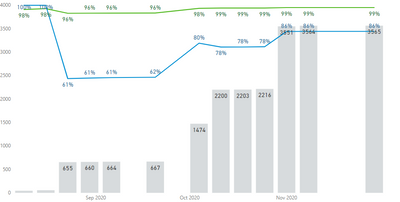
I was trying to build a rolling cumulative count column chart on PowerBI. And the count is weekly basis (each column represents the total number of rows in the table before that week). Because all the columns will be used as Filters, I used 'ALLSELECTED' function.
Here is the problem: if I started to apply the filter and the cumulative count didn't change between two or more weeks, the column chart would show an empty column for those weeks. How can I fill in those empty columns with the same columns in the previous week? I'm not sure this is due to the default setting of PowerBI or my code
Here is my code:
Thanks!
It looks doable but I am not sure about what leads to empty bar. Can you share the a sample of your current data?
Paul
If there is no data to include, you cannot in DAX. You need to add through Power Query or the source system values of 0 for the missing week.
If the weeks exist in your fact table but are blank or null in Power Query, replace with 0 before loading.
If you have a date table from Power Query, you could create an anti-join on your data table and date table, keeping only dates/weeks that don't exist in your data, then append it to the bottom of your table with $0 value.
DAX is for Analysis. Power Query is for Data Modeling
Proud to be a Super User!
MCSA: BI ReportingCheck out the April 2026 Power BI update to learn about new features.
If you have recently started exploring Fabric, we'd love to hear how it's going. Your feedback can help with product improvements.
A new Power BI DataViz World Championship is coming this June! Don't miss out on submitting your entry.
| User | Count |
|---|---|
| 3 | |
| 2 | |
| 2 | |
| 2 | |
| 2 |
| User | Count |
|---|---|
| 5 | |
| 5 | |
| 4 | |
| 4 | |
| 4 |