cancel
Showing results for 
Search instead for 
Did you mean: 

The Power BI Data Visualization World Championships is back! Get ahead of the game and start preparing now! Learn more

Reply
DanielaFerreira
Regular Visitor

Create sequence based on another power query column

Hi guys, 

Could you help me with difficulty bellow?

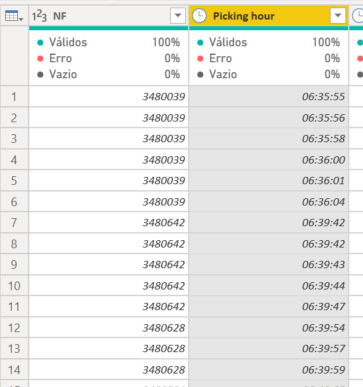
I need creat a sequencebeging from 1 acording with the colum "Picking hour", but when the colum NF change I need to restart the sequence from 1 again. 


DanielaFerreira_0-1652726769038.png

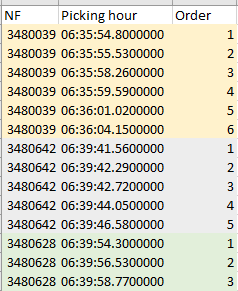
Bellow one exemple that I need


DanielaFerreira_1-1652726906975.png


Thanks a lot

1 ACCEPTED SOLUTION
AlexisOlson
Super User
Super User

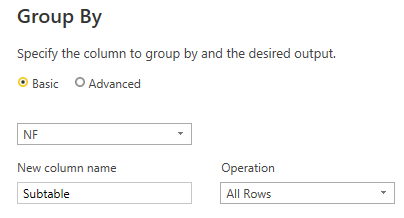
You can do this by grouping on [NF] keeping All Rows

AlexisOlson_0-1652728498930.png

And then edit the code generated to add an index column to each group.


Full M query example you can paste into the Advanced Editor after creating a new Blank Query:

let
    Source = Table.FromRows(Json.Document(Binary.Decompress(Binary.FromText("i45WclTSUTI1VYrVgTLNEEwLMNMJyDQwRDBNwExnINPECME0RjCRFJgrxcYCAA==", BinaryEncoding.Base64), Compression.Deflate)), let _t = ((type nullable text) meta [Serialized.Text = true]) in type table [NF = _t, #"Picking hour" = _t]),
    #"Grouped Rows" = Table.Group(Source, {"NF"}, {{"Subtable", each Table.AddIndexColumn(_, "Order", 1, 1), type table}}),
    #"Expanded Count" = Table.ExpandTableColumn(#"Grouped Rows", "Subtable", {"Picking hour", "Order"}, {"Picking hour", "Order"})
in
    #"Expanded Count"

View solution in original post

2 REPLIES 2
AlexisOlson
Super User
Super User

You can do this by grouping on [NF] keeping All Rows

AlexisOlson_0-1652728498930.png

And then edit the code generated to add an index column to each group.


Full M query example you can paste into the Advanced Editor after creating a new Blank Query:

let
    Source = Table.FromRows(Json.Document(Binary.Decompress(Binary.FromText("i45WclTSUTI1VYrVgTLNEEwLMNMJyDQwRDBNwExnINPECME0RjCRFJgrxcYCAA==", BinaryEncoding.Base64), Compression.Deflate)), let _t = ((type nullable text) meta [Serialized.Text = true]) in type table [NF = _t, #"Picking hour" = _t]),
    #"Grouped Rows" = Table.Group(Source, {"NF"}, {{"Subtable", each Table.AddIndexColumn(_, "Order", 1, 1), type table}}),
    #"Expanded Count" = Table.ExpandTableColumn(#"Grouped Rows", "Subtable", {"Picking hour", "Order"}, {"Picking hour", "Order"})
in
    #"Expanded Count"

It worked Alexis!!

Thanks so much!!

Helpful resources

Announcements
Power BI DataViz World Championships

Power BI Dataviz World Championships

The Power BI Data Visualization World Championships is back! Get ahead of the game and start preparing now!

December 2025 Power BI Update Carousel

Power BI Monthly Update - December 2025

Check out the December 2025 Power BI Holiday Recap!

FabCon Atlanta 2026 carousel

FabCon Atlanta 2026

Join us at FabCon Atlanta, March 16-20, for the ultimate Fabric, Power BI, AI and SQL community-led event. Save $200 with code FABCOMM.

Top Solution Authors