cancel
Showing results for 
Search instead for 
Did you mean: 

Join the FabCon + SQLCon recap series. Up next: Power BI, Real-Time Intelligence, IQ and AI, and Data Factory take center stage. All sessions are available on-demand after the live show. Register now

Reply
ThiemenSiemensm
Frequent Visitor

Create list from range and values

Hi everyone,


I need an extra column in power query (list) from which I can generate a set of rows in power query for each of the items in the list.

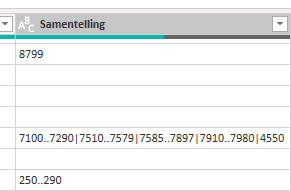
The contents of the list must be based values in another column (shown below). The list should contain the range min1..max1 and min2..max2, where the ranges are split by an | sign. For instance the combination "1..5|10..15|20" would generate the list containing the values 1,2,3,4,5,10,11,12,13,14,15,20. Does anyone know how this is done in power query? Secondly, I would like to add as many rows as items in the list, where the new row value is the value from the list.

Looking forward to your responses!


ThiemenSiemensm_0-1673701515720.png


1 ACCEPTED SOLUTION
ppm1
Solution Sage
Solution Sage

Here's one way to do it in the query editor.  To see how it works, just create a blank query, open the Advanced Editor and replace the text there with the M code below.


let
    Source = Table.FromRows(Json.Document(Binary.Decompress(Binary.FromText("i45WMtTTM60xNNDTMzStMQJSxgZKsTpAYQOQkBFIDMgwMoSIGoPoWAA=", BinaryEncoding.Base64), Compression.Deflate)), let _t = ((type nullable text) meta [Serialized.Text = true]) in type table [ListsAsText = _t]),
    #"Changed Type" = Table.TransformColumnTypes(Source,{{"ListsAsText", type text}}),
    #"Added Custom" = Table.AddColumn(#"Changed Type", "Custom", each List.Combine(List.Transform(Text.Split([ListsAsText], "|"), each Expression.Evaluate("{"&_&"}")))),
    #"Expanded Custom" = Table.ExpandListColumn(#"Added Custom", "Custom")
in
    #"Expanded Custom"


Pat


Microsoft Employee

View solution in original post

4 REPLIES 4
KeyurPatel14
Responsive Resident
Responsive Resident

Can you please provide sample data fileso that I can help you quicker.


wdx223_Daniel
Community Champion
Community Champion

=Table.AddColumn(PreviousStepName,"Custom",each Expression.Evaluate("{"&Text.Replace([Samentelling],"|",",")&"}"))

ppm1
Solution Sage
Solution Sage

Here's one way to do it in the query editor.  To see how it works, just create a blank query, open the Advanced Editor and replace the text there with the M code below.


let
    Source = Table.FromRows(Json.Document(Binary.Decompress(Binary.FromText("i45WMtTTM60xNNDTMzStMQJSxgZKsTpAYQOQkBFIDMgwMoSIGoPoWAA=", BinaryEncoding.Base64), Compression.Deflate)), let _t = ((type nullable text) meta [Serialized.Text = true]) in type table [ListsAsText = _t]),
    #"Changed Type" = Table.TransformColumnTypes(Source,{{"ListsAsText", type text}}),
    #"Added Custom" = Table.AddColumn(#"Changed Type", "Custom", each List.Combine(List.Transform(Text.Split([ListsAsText], "|"), each Expression.Evaluate("{"&_&"}")))),
    #"Expanded Custom" = Table.ExpandListColumn(#"Added Custom", "Custom")
in
    #"Expanded Custom"


Pat


Microsoft Employee

Thanks, this worked!

Helpful resources

Announcements
April Power BI Update Carousel

Power BI Monthly Update - April 2026

Check out the April 2026 Power BI update to learn about new features.

New to Fabric survey Carousel

New to Fabric Survey

If you have recently started exploring Fabric, we'd love to hear how it's going. Your feedback can help with product improvements.

Power BI DataViz World Championships carousel

Power BI DataViz World Championships - June 2026

A new Power BI DataViz World Championship is coming this June! Don't miss out on submitting your entry.

FabCon and SQLCon Highlights Carousel

FabCon &SQLCon Highlights

Experience the highlights from FabCon & SQLCon, available live and on-demand starting April 14th.