Get certified for free when you join Fabric Data Days 2026 and dive into Fabric, Power BI, SQL, AI, and other essential data skills.
Join nowTry your skills in the Power BI Dataviz World Championship! Round one ends June 26. Join now
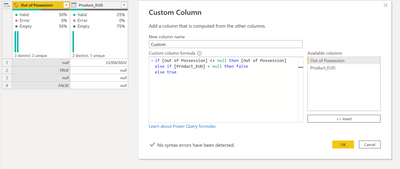
Hi, I'm trying to create a custom column for inventory purposes. There are two relevant columns I need to include in the formula:
The data I'm bringing into PQ is already populated with some of this data, but I want the custom column to populate via a check on the existing data. The logic would be something like this:
How can I create a custom column formula to capture this logic? I'm having some difficulty composing it with the M language.
Solved! Go to Solution.
Hi @DDesmond
You already have it
if [Out of Possession] <> null then [Out of Possession]
else if [Product_EUD] = null then false
else true
Hi @DDesmond
You already have it
if [Out of Possession] <> null then [Out of Possession]
else if [Product_EUD] = null then false
else true
| User | Count |
|---|---|
| 4 | |
| 4 | |
| 3 | |
| 3 | |
| 2 |
| User | Count |
|---|---|
| 12 | |
| 6 | |
| 5 | |
| 5 | |
| 5 |