This is best Fabric, Power BI, SQL and AI community event. How do we know? The last event sold out! Save €200 with code FABCMTY200.
Register nowThe Fabric community is upgrading! Read all of the details including the timeline and what you can expect. Learn more
Hi,
I'm very new to PowerQuery but have a task that makes me mad.
Imagine I have a table that possesses 3 columns: "Start Date", "End Date", and "Name". Say, this table contains information about sprints.
I need to convert this table into another one that contains only 2 columns: "Date" and "Name". So that each date within a period [StartDate...EndDate] gets a line within my second table.
Example:
Input Table:
| Start Date | End Date | Name |
| 1 Jan 2023 | 5 Jan 2023 | Sprint 1 |
| 10 Jan 2023 | 11 Jan 2023 | Sprint 2 |
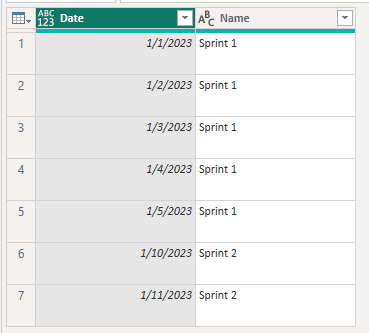
Output Table:
| Date | Name |
| 1 Jan 2023 | Sprint 1 |
| 2 Jan 2023 | Sprint 1 |
| 3 Jan 2023 | Sprint 1 |
| 4 Jan 2023 | Sprint 1 |
| 5 Jan 2023 | Sprint 1 |
| 10 Jan 2023 | Sprint 2 |
| 11 Jan 2023 | Sprint 2 |
It's clear to me that I should walk through the InputTable row by row and then fulfill the OutputTable using the row data. But... no idea how to do it in practice. Could someone help me with this?
Solved! Go to Solution.
Hi @VladSorokin ,
Please follow the steps below:
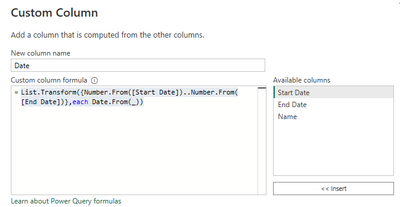
in power quert editor --> add a custom column:
List.Transform({Number.From([Start Date])..Number.From([End Date])},each Date.From(_))
expand [Date] and remove [Start Date] and [End Date]:
Best Regards,
Gao
Community Support Team
If there is any post helps, then please consider Accept it as the solution to help the other members find it more quickly. If I misunderstand your needs or you still have problems on it, please feel free to let us know. Thanks a lot!
How to get your questions answered quickly -- How to provide sample data in the Power BI Forum
Hi @VladSorokin ,
Please follow the steps below:
in power quert editor --> add a custom column:
List.Transform({Number.From([Start Date])..Number.From([End Date])},each Date.From(_))
expand [Date] and remove [Start Date] and [End Date]:
Best Regards,
Gao
Community Support Team
If there is any post helps, then please consider Accept it as the solution to help the other members find it more quickly. If I misunderstand your needs or you still have problems on it, please feel free to let us know. Thanks a lot!
How to get your questions answered quickly -- How to provide sample data in the Power BI Forum
Thanks a lot, Gao, this works!!!
I won't give you the full answer but you can represent dates as numbers and then if you create a list using
{[start]..[end]} you can expand that 'to rows' and convert back to dates.
There are examples on the forum or on the web.
Join us in Barcelona for FabCon and SQLCon, the Fabric, Power BI, SQL, and AI community event. Save €200 with code FABCMTY200.