cancel
Showing results for 
Search instead for 
Did you mean: 

July 7 - July 17 | Round 2 of the Power BI Dataviz World Championships. Don't miss your chance! Learn more

Reply
Tlotly
Helper V
Helper V

Create a custom column containing a variable

Good day

Please assist.


How do I create a column in powerquery with the following DAX?

DefaultYear = if(YEAR(TODAY()) = 'Branch Scores'[FinYear],
"DefaultYear"
,
'Branch Scores'[FinYear])


Kind regards


1 ACCEPTED SOLUTION
v-kelly-msft
Community Support
Community Support

Hi @Tlotly ,


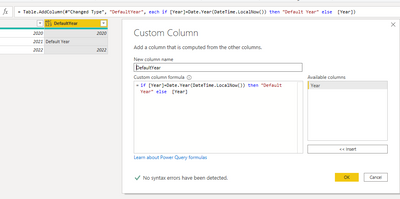
Create a column as below:


=if [Year]=Date.Year(DateTime.LocalNow()) then "Default Year" else  [Year]

vkellymsft_0-1626150755957.png

For my sample .pbix file ,pls see attached.


Best Regards,
Kelly

Did I answer your question? Mark my post as a solution!

View solution in original post

6 REPLIES 6
v-kelly-msft
Community Support
Community Support

Hi @Tlotly ,


Create a column as below:


=if [Year]=Date.Year(DateTime.LocalNow()) then "Default Year" else  [Year]

vkellymsft_0-1626150755957.png

For my sample .pbix file ,pls see attached.


Best Regards,
Kelly

Did I answer your question? Mark my post as a solution!

Anonymous
Not applicable

PriorStepName should be replaced with YOUR actual prior step name (the name of your previous step.

Anonymous
Not applicable

Try this:

DefaultYear = Table.AddColumn (PriorStepName, "Year", each if Date.IsInCurrentYear([FinYear]) then "DefaultYear" else [FinYear])
 
--Nate
,
'Branch Scores'[FinYear])


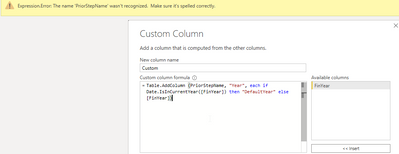
@Anonymous  Thank you. It's complaining about PriorStepName not being recognised. 


Tlotly_0-1626076666096.png


mahoneypat
Microsoft Employee
Microsoft Employee

You can try this expression in a custom column, assuming your FinYear column is type date.


= if [FinYear] = Date.From(DateTime.LocalNow()) then "Default Year" else [FinYear]


Pat


Did I answer your question? Mark my post as a solution! Kudos are also appreciated!

To learn more about Power BI, follow me on Twitter or subscribe on YouTube.


@mahoneypa HoosierBI on YouTube


@mahoneypat  Thank you. I tried the above code but it doesn't work for financial dates since my slicer is based on the financial period.  E.g. My Financial dates are from July to June so when I get to 01 July 2021, it will still default to 2021 as the code you sent is comparing to today. I will want that to default to the new financial year which will be 2022.

Helpful resources

Announcements
FabCon and SQLCon Barcelona 2026

FabCon & SQLCon – Barcelona 2026

Join us in Barcelona for FabCon and SQLCon, the Fabric, Power BI, SQL, and AI community event. Save €200 with code FABCMTY200.

60 days of Data Days Carousel

Data Days 2026

Join Fabric Data Days 2026: 60 days of free live/on-demand sessions, challenges, study groups, and certification opportunities.

Power BI DataViz World Championships carousel

Power BI DataViz World Championships - June 2026

A new Power BI DataViz World Championship is coming this June! Don't miss out on submitting your entry.