Join us at FabCon Atlanta from March 16 - 20, 2026, for the ultimate Fabric, Power BI, AI and SQL community-led event. Save $200 with code FABCOMM.
Register now!Learn from the best! Meet the four finalists headed to the FINALS of the Power BI Dataviz World Championships! Register now
Good day
Please assist.
How do I create a column in powerquery with the following DAX?
Kind regards
Solved! Go to Solution.
Hi @Tlotly ,
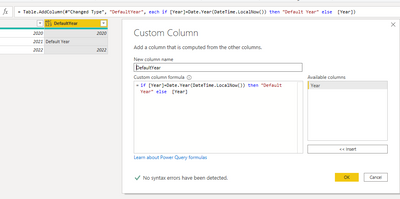
Create a column as below:
=if [Year]=Date.Year(DateTime.LocalNow()) then "Default Year" else [Year]
For my sample .pbix file ,pls see attached.
Best Regards,
Kelly
Did I answer your question? Mark my post as a solution!
Hi @Tlotly ,
Create a column as below:
=if [Year]=Date.Year(DateTime.LocalNow()) then "Default Year" else [Year]
For my sample .pbix file ,pls see attached.
Best Regards,
Kelly
Did I answer your question? Mark my post as a solution!
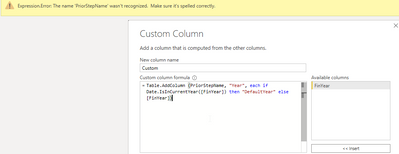
PriorStepName should be replaced with YOUR actual prior step name (the name of your previous step.
Try this:
@Anonymous Thank you. It's complaining about PriorStepName not being recognised.
You can try this expression in a custom column, assuming your FinYear column is type date.
= if [FinYear] = Date.From(DateTime.LocalNow()) then "Default Year" else [FinYear]
Pat
To learn more about Power BI, follow me on Twitter or subscribe on YouTube.
@mahoneypat Thank you. I tried the above code but it doesn't work for financial dates since my slicer is based on the financial period. E.g. My Financial dates are from July to June so when I get to 01 July 2021, it will still default to 2021 as the code you sent is comparing to today. I will want that to default to the new financial year which will be 2022.
Share feedback directly with Fabric product managers, participate in targeted research studies and influence the Fabric roadmap.
Check out the February 2026 Power BI update to learn about new features.
| User | Count |
|---|---|
| 16 | |
| 12 | |
| 10 | |
| 7 | |
| 6 |