Don't miss your chance to take the Fabric Data Engineer (DP-700) exam on us!
Learn moreThe FabCon + SQLCon recap series starts April 14th at 8am Pacific. If you’re tracking where AI is going inside Fabric, this first session is a can't miss. Register now
Hi Community Members,
I have a column ID with values 50, 70, 10, 5, 95, 100, 100, 225
I want to create an index column (1 - 8 )such that the lowest value in the ID column gets the value 1 and the highest in the id column gets value 8.
Here 5 will get index value 1, 10 will get index value 2 ........ 225 will get index value 8.
I can do it using rankx but want to try this in Power Query.
Regards,
Harsh Nathani
Solved! Go to Solution.
Sure, just add 2 steps
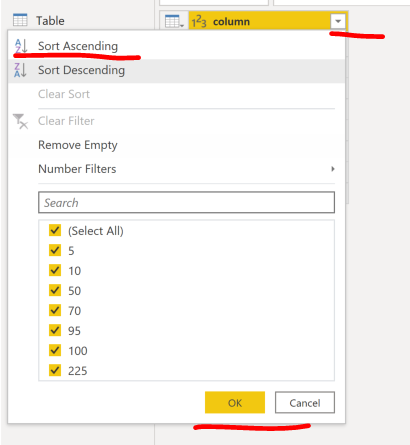
1. sort you values column in Ascending order.
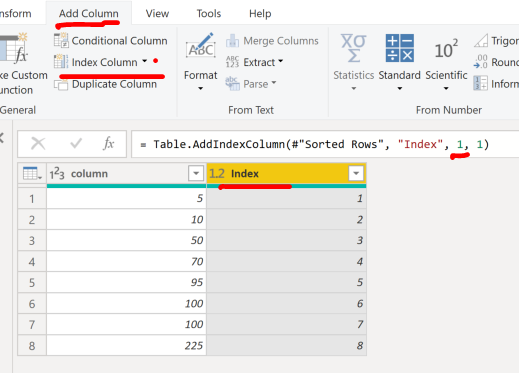
2. Add an Index column as below, click on the small down arrow next to index column and select "from 1" or adjust the code to start from 1 after.
Sure, just add 2 steps
1. sort you values column in Ascending order.
2. Add an Index column as below, click on the small down arrow next to index column and select "from 1" or adjust the code to start from 1 after.
If you have recently started exploring Fabric, we'd love to hear how it's going. Your feedback can help with product improvements.
A new Power BI DataViz World Championship is coming this June! Don't miss out on submitting your entry.
Share feedback directly with Fabric product managers, participate in targeted research studies and influence the Fabric roadmap.
| User | Count |
|---|---|
| 5 | |
| 4 | |
| 3 | |
| 2 | |
| 2 |
| User | Count |
|---|---|
| 8 | |
| 6 | |
| 6 | |
| 6 | |
| 5 |