Join us at FabCon Atlanta from March 16 - 20, 2026, for the ultimate Fabric, Power BI, AI and SQL community-led event. Save $200 with code FABCOMM.
Register now!The Power BI Data Visualization World Championships is back! It's time to submit your entry. Live now!
Hi Community Members,
I have a column ID with values 50, 70, 10, 5, 95, 100, 100, 225
I want to create an index column (1 - 8 )such that the lowest value in the ID column gets the value 1 and the highest in the id column gets value 8.
Here 5 will get index value 1, 10 will get index value 2 ........ 225 will get index value 8.
I can do it using rankx but want to try this in Power Query.
Regards,
Harsh Nathani
Solved! Go to Solution.
Sure, just add 2 steps
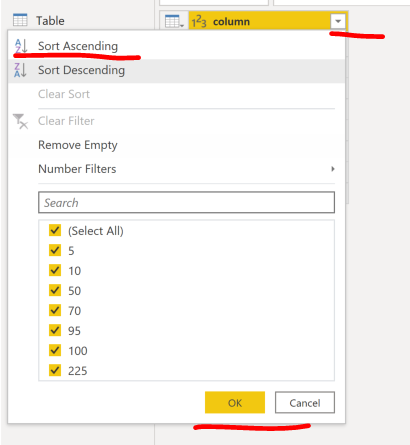
1. sort you values column in Ascending order.
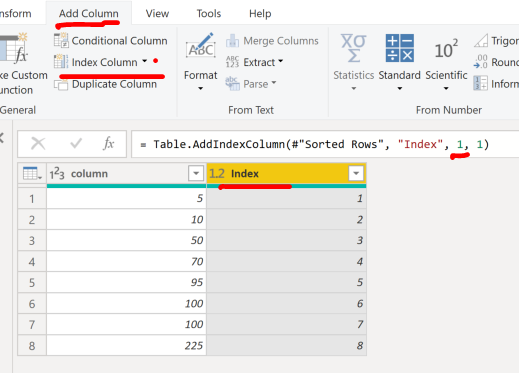
2. Add an Index column as below, click on the small down arrow next to index column and select "from 1" or adjust the code to start from 1 after.
Sure, just add 2 steps
1. sort you values column in Ascending order.
2. Add an Index column as below, click on the small down arrow next to index column and select "from 1" or adjust the code to start from 1 after.
| User | Count |
|---|---|
| 19 | |
| 13 | |
| 9 | |
| 8 | |
| 7 |