Hi @hello_MTC ,
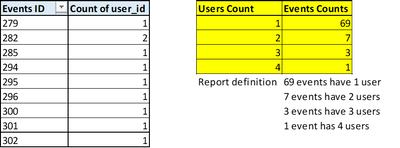
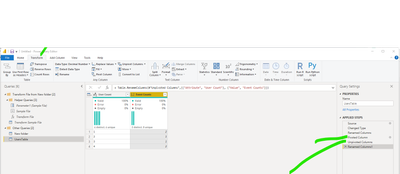
Here is my m code. Go to Power Query, select New Source, Blank Query, and then go to Advanced Editor, and paste this code there. You will see the table that I dummied up and the various steps.
Let me know if you have any questions.
If this solves your issues, please mark it as the solution, so that others can find it easily. Kudos 👍are nice too.
Nathaniel
let
    Source = Table.FromRows(Json.Document(Binary.Decompress(Binary.FromText("i45WMjQwVNJRMlSK1QGxjRBsQxDbCMoGqTGGsE3NgGwTCNvSEsKOBQA=", BinaryEncoding.Base64), Compression.Deflate)), let _t = ((type nullable text) meta [Serialized.Text = true]) in type table [ID = _t, #"Count of User ID" = _t]),
    #"Changed Type" = Table.TransformColumnTypes(Source,{{"ID", Int64.Type}, {"Count of User ID", Int64.Type}}),
    #"Renamed Columns" = Table.RenameColumns(#"Changed Type",{{"ID", "Events ID"}}),
    #"Pivoted Column" = Table.Pivot(Table.TransformColumnTypes(#"Renamed Columns", {{"Count of User ID", type text}}, "en-US"), List.Distinct(Table.TransformColumnTypes(#"Renamed Columns", {{"Count of User ID", type text}}, "en-US")[#"Count of User ID"]), "Count of User ID", "Events ID", List.Count),
    #"Unpivoted Columns" = Table.UnpivotOtherColumns(#"Pivoted Column", {}, "Attribute", "Value"),
    #"Renamed Columns1" = Table.RenameColumns(#"Unpivoted Columns",{{"Attribute", "User Count"}, {"Value", "Event Counts"}})
in
    #"Renamed Columns1"
Did I answer your question? Mark my post as a solution!Proud to be a Super User!