cancel
Showing results for 
Search instead for 
Did you mean: 

July 7 - July 17 | Round 2 of the Power BI Dataviz World Championships. Don't miss your chance! Learn more

Reply
hello_MTC
Helper III
Helper III

Create New Table with row count

HELP!


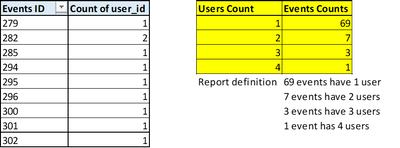
I want to create a new table like I've created in an Excel. I've made a yellow table(right) from a pivot table(left).


hello_MTC_2-1656916286558.png


I will appreciate your help!


5 REPLIES 5
hello_MTC
Helper III
Helper III

Nathaniel_C
Community Champion
Community Champion

Hi @hello_MTC ,
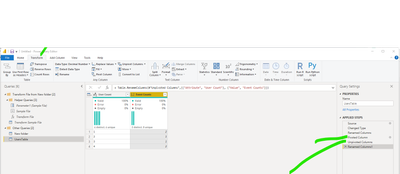
First you must pivot columns and then unpivot columns.

Nathaniel_C_1-1656954602839.png


Let me know if you have any questions.

If this solves your issues, please mark it as the solution, so that others can find it easily. Kudos 👍are nice too.
Nathaniel


Did I answer your question? Mark my post as a solution!

Proud to be a Super User!


Hi @hello_MTC ,

Here is my m code. Go to Power Query,  select New Source, Blank Query, and then go to Advanced Editor, and paste this code there.  You will see the table that I dummied up and the various steps.


Let me know if you have any questions.

If this solves your issues, please mark it as the solution, so that others can find it easily. Kudos 👍are nice too.
Nathaniel

let
    Source = Table.FromRows(Json.Document(Binary.Decompress(Binary.FromText("i45WMjQwVNJRMlSK1QGxjRBsQxDbCMoGqTGGsE3NgGwTCNvSEsKOBQA=", BinaryEncoding.Base64), Compression.Deflate)), let _t = ((type nullable text) meta [Serialized.Text = true]) in type table [ID = _t, #"Count of User ID" = _t]),
    #"Changed Type" = Table.TransformColumnTypes(Source,{{"ID", Int64.Type}, {"Count of User ID", Int64.Type}}),
    #"Renamed Columns" = Table.RenameColumns(#"Changed Type",{{"ID", "Events ID"}}),
    #"Pivoted Column" = Table.Pivot(Table.TransformColumnTypes(#"Renamed Columns", {{"Count of User ID", type text}}, "en-US"), List.Distinct(Table.TransformColumnTypes(#"Renamed Columns", {{"Count of User ID", type text}}, "en-US")[#"Count of User ID"]), "Count of User ID", "Events ID", List.Count),
    #"Unpivoted Columns" = Table.UnpivotOtherColumns(#"Pivoted Column", {}, "Attribute", "Value"),
    #"Renamed Columns1" = Table.RenameColumns(#"Unpivoted Columns",{{"Attribute", "User Count"}, {"Value", "Event Counts"}})
in
    #"Renamed Columns1"


Did I answer your question? Mark my post as a solution!

Proud to be a Super User!


No, this is not what I want but thank you so much for your efforts. I really appreciate it.

I am very close to complete this process.

This is what I need in new table.

hello_MTC_0-1656995210786.png

And this is what I got in new table.
hello_MTC_1-1656995261441.png

I am just figuring out how will I get those count of user id in new column.

Hi @hello_MTC ,


There are two simple methods to achieve the outcome:

Power Query

1. duplicate/reference the existing table,

2. then use group by:

 .2a. Home > Group By:

KT_Bsmart2gethe_0-1657194258070.png


Power BI report

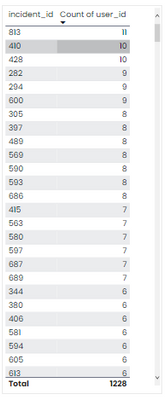
KT_Bsmart2gethe_1-1657194469598.png

pivot table in Power Bi


Regards

KT

Helpful resources

Announcements
FabCon and SQLCon Barcelona 2026

FabCon & SQLCon – Barcelona 2026

Join us in Barcelona for FabCon and SQLCon, the Fabric, Power BI, SQL, and AI community event. Save €200 with code FABCMTY200.

60 days of Data Days Carousel

Data Days 2026

Join Fabric Data Days 2026: 60 days of free live/on-demand sessions, challenges, study groups, and certification opportunities.

Power BI DataViz World Championships carousel

Power BI DataViz World Championships - June 2026

A new Power BI DataViz World Championship is coming this June! Don't miss out on submitting your entry.