Don't miss your chance to take the Fabric Data Engineer (DP-600) exam for FREE! Find out how by watching the DP-600 session on-demand now through April 28th.
Learn moreJoin the FabCon + SQLCon recap series. Up next: Power BI, Real-Time Intelligence, IQ and AI, and Data Factory take center stage. All sessions are available on-demand after the live show. Register now
Hi all,
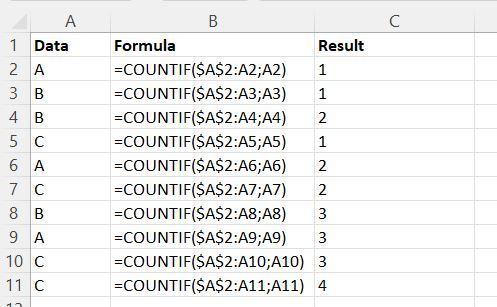
I'm rather new to Power BI and I would like some help with creating a counter. The first time a value occurs in a column, I would like to have value "1", the second time it occurs value "2", and so on.
I know how to do this in Excel but not in Query Editor. Hopefully someone can help me out.
Greetings.
Solved! Go to Solution.
I think this blogpost by Reza Rad might help you get to your solutions:
https://radacad.com/create-row-number-for-each-group-in-power-bi-using-power-query
It uses an index with a group by function. The explanation is easily written and you can just follow the steps replacing the example columnames by the column names in your data.
I think this blogpost by Reza Rad might help you get to your solutions:
https://radacad.com/create-row-number-for-each-group-in-power-bi-using-power-query
It uses an index with a group by function. The explanation is easily written and you can just follow the steps replacing the example columnames by the column names in your data.
Check out the April 2026 Power BI update to learn about new features.
If you have recently started exploring Fabric, we'd love to hear how it's going. Your feedback can help with product improvements.
A new Power BI DataViz World Championship is coming this June! Don't miss out on submitting your entry.
| User | Count |
|---|---|
| 5 | |
| 3 | |
| 3 | |
| 3 | |
| 3 |
| User | Count |
|---|---|
| 8 | |
| 6 | |
| 5 | |
| 5 | |
| 4 |