cancel
Showing results for 
Search instead for 
Did you mean: 

July 7 - July 17 | Round 2 of the Power BI Dataviz World Championships. Don't miss your chance! Learn more

Reply
Anonymous
Not applicable

Count rows where year is .....

Hi,

Ive got an excel import of orders.

One of the collums is called [reden van annulering] I want to count all the rows where the Year value is, for example, 2021.


Tried formula below but this won't work. Any one an idea what i should use instead?

annuleringen 2021 = CALCULATE( COUNTROWS(ALL(Sheet0[reden voor annulering] where YEAR ( Sheet0[datum verwijsbrief] ) = 2021)))

2 ACCEPTED SOLUTIONS
Anonymous
Not applicable

Hi @Anonymous .

Try this DAX;

annuleringen 2021 = CALCULATE( COUNTROWS(Sheet0), YEAR ( Sheet0[datum verwijsbrief] ) = 2021)).

Regards,
Sanket.

If this post helps , then mark it as 'Accept as Answer' and give it a thumbs up.


View solution in original post

v-jingzhang
Community Support
Community Support

Hi @Anonymous 


It seems you want to count the non-blank rows in [reden voor annulering] column for every year. You can first add a Year column to the table.

vjingzhang_0-1647510638753.png


Then create the following measure

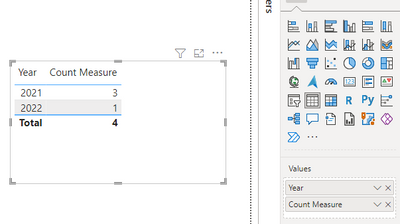
Count Measure = CALCULATE(COUNT(Sheet0[reden voor annulering]),Sheet0[reden voor annulering]<>BLANK())


Put Year column and the measure into a table visual, you will get the count for every year. 

vjingzhang_1-1647510858465.png


Best Regards,
Community Support Team _ Jing
If this post helps, please Accept it as Solution to help other members find it.

View solution in original post

4 REPLIES 4
v-jingzhang
Community Support
Community Support

Hi @Anonymous 


It seems you want to count the non-blank rows in [reden voor annulering] column for every year. You can first add a Year column to the table.

vjingzhang_0-1647510638753.png


Then create the following measure

Count Measure = CALCULATE(COUNT(Sheet0[reden voor annulering]),Sheet0[reden voor annulering]<>BLANK())


Put Year column and the measure into a table visual, you will get the count for every year. 

vjingzhang_1-1647510858465.png


Best Regards,
Community Support Team _ Jing
If this post helps, please Accept it as Solution to help other members find it.

Anonymous
Not applicable

Hans_Delwel_0-1647261952476.png


Anonymous
Not applicable

This way it counts all the rows, i want only to count the rows in column Sheet0[reden voor annulering] idf this is filled with an tekst value (this tekst are different reasons)

Anonymous
Not applicable

Hi @Anonymous .

Try this DAX;

annuleringen 2021 = CALCULATE( COUNTROWS(Sheet0), YEAR ( Sheet0[datum verwijsbrief] ) = 2021)).

Regards,
Sanket.

If this post helps , then mark it as 'Accept as Answer' and give it a thumbs up.


Helpful resources

Announcements
FabCon and SQLCon Barcelona 2026

FabCon & SQLCon – Barcelona 2026

Join us in Barcelona for FabCon and SQLCon, the Fabric, Power BI, SQL, and AI community event. Save €200 with code FABCMTY200.

60 days of Data Days Carousel

Data Days 2026

Join Fabric Data Days 2026: 60 days of free live/on-demand sessions, challenges, study groups, and certification opportunities.

Power BI DataViz World Championships carousel

Power BI DataViz World Championships - June 2026

A new Power BI DataViz World Championship is coming this June! Don't miss out on submitting your entry.