Don't miss your chance to take the Fabric Data Engineer (DP-600) exam for FREE! Find out how by watching the DP-600 session on-demand now through April 28th.
Learn moreJoin the FabCon + SQLCon recap series. Up next: Power BI, Real-Time Intelligence, IQ and AI, and Data Factory take center stage. All sessions are available on-demand after the live show. Register now
Hello everybody,
I am farely new to PBI and am trying to solve a problem for some days now. I can't imagine anymore what i haven't tried, measures, (DAX) and (M) formulas, distinctcount, duplicate tables, reference tables, but nothing seems to work and i can't find a solution.
I have a table with numerous colums. De table is being updated regularly and the number of rows are growing.
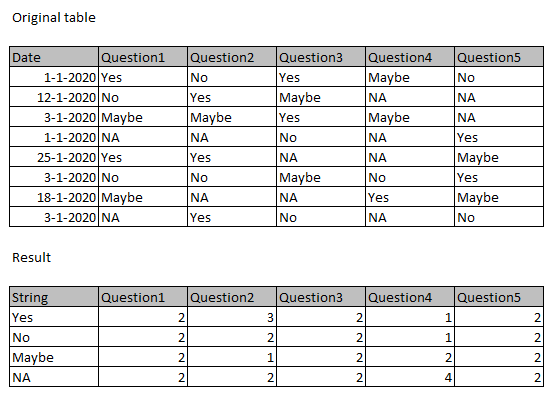
The table consists of a questionary with only 4 possible answers. However the questionary itself has around 25 question.
What i need to get is this:
The date field is only for filtering.
Can anybody help me do this?
Thanx in advance!
Solved! Go to Solution.
Hi @Presti73 ,
You could try to transform data structure, choose Q1~Q5 columns, then click "unpivot column" in Edit Queries, and use this in Matrix, you will get result you want. You could refer to my sample for details.
Best Regards,
Zoe Zhi
If this post helps, then please consider Accept it as the solution to help the other members find it more quickly.
Hi @Presti73 ,
You could try to transform data structure, choose Q1~Q5 columns, then click "unpivot column" in Edit Queries, and use this in Matrix, you will get result you want. You could refer to my sample for details.
Best Regards,
Zoe Zhi
If this post helps, then please consider Accept it as the solution to help the other members find it more quickly.
Thank you both for your solution!
The unpivoted columns did the trick. Keeping columns in on wich filters could be based, made it very versatile and usable on all visuals.
Seems like you need a multi-column aggregation: https://community.powerbi.com/t5/Quick-Measures-Gallery/Multi-Column-Aggregations-MC-Aggregations/m-...
Check out the April 2026 Power BI update to learn about new features.
If you have recently started exploring Fabric, we'd love to hear how it's going. Your feedback can help with product improvements.
A new Power BI DataViz World Championship is coming this June! Don't miss out on submitting your entry.
| User | Count |
|---|---|
| 5 | |
| 3 | |
| 3 | |
| 3 | |
| 3 |
| User | Count |
|---|---|
| 8 | |
| 6 | |
| 5 | |
| 5 | |
| 4 |