cancel
Showing results for 
Search instead for 
Did you mean: 

Learn from the best! Meet the four finalists headed to the FINALS of the Power BI Dataviz World Championships! Register now

Reply
Presti73
Frequent Visitor

Count problem

Hello everybody,


I am farely new to PBI and am trying to solve a problem for some days now. I can't imagine anymore what i haven't tried, measures, (DAX) and (M) formulas, distinctcount, duplicate tables, reference tables, but nothing seems to work and i can't find a solution.

I have a table with numerous colums. De table is being updated regularly and the number of rows are growing.

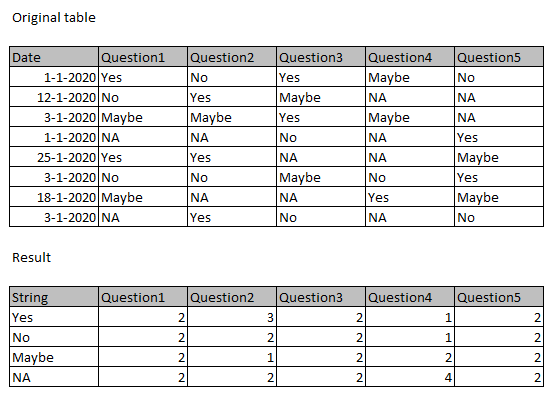
The table consists of a questionary with only 4 possible answers. However the questionary itself has around 25 question.

What i need to get is this:


BEOCount.png

The date field is only for filtering.

Can anybody help me do this?

Thanx in advance!

1 ACCEPTED SOLUTION
dax
Community Support
Community Support

Hi @Presti73 , 

You could try to transform data structure, choose Q1~Q5 columns, then click "unpivot column" in Edit Queries, and use this in Matrix, you will get result you want. You could refer to my sample for details.

Best Regards,
Zoe Zhi

If this post helps, then please consider Accept it as the solution to help the other members find it more quickly.


View solution in original post

3 REPLIES 3
dax
Community Support
Community Support

Hi @Presti73 , 

You could try to transform data structure, choose Q1~Q5 columns, then click "unpivot column" in Edit Queries, and use this in Matrix, you will get result you want. You could refer to my sample for details.

Best Regards,
Zoe Zhi

If this post helps, then please consider Accept it as the solution to help the other members find it more quickly.


Presti73
Frequent Visitor

Thank you both for your solution!

The unpivoted columns did the trick. Keeping columns in on wich filters could be based, made it very versatile and usable on all visuals.

Greg_Deckler
Community Champion
Community Champion

Seems like you need a multi-column aggregation: https://community.powerbi.com/t5/Quick-Measures-Gallery/Multi-Column-Aggregations-MC-Aggregations/m-...


Follow on LinkedIn
@ me in replies or I'll lose your thread!!!
Instead of a Kudo, please vote for this idea
Become an expert!: Enterprise DNA
External Tools: MSHGQM
YouTube Channel!: Microsoft Hates Greg
Latest book!:
DAX For Humans

DAX is easy, CALCULATE makes DAX hard...

Helpful resources

Announcements
Join our Fabric User Panel

Join our Fabric User Panel

Share feedback directly with Fabric product managers, participate in targeted research studies and influence the Fabric roadmap.

February Power BI Update Carousel

Power BI Monthly Update - February 2026

Check out the February 2026 Power BI update to learn about new features.

FabCon Atlanta 2026 carousel

FabCon Atlanta 2026

Join us at FabCon Atlanta, March 16-20, for the ultimate Fabric, Power BI, AI and SQL community-led event. Save $200 with code FABCOMM.

Top Solution Authors