Get Fabric or SQL Certified for Free.
Get certified for free when you join Fabric Data Days 2026 and dive into Fabric, Power BI, SQL, AI, and other essential data skills.
Join now- Power BI forums
- Get Help with Power BI
- Desktop
- Service
- Report Server
- Power Query
- Mobile Apps
- Developer
- DAX Commands and Tips
- Custom Visuals Development Discussion
- Health and Life Sciences
- Power BI Spanish forums
- Translated Spanish Desktop
- Training and Consulting
- Instructor Led Training
- Dashboard in a Day for Women, by Women
- Galleries
- Data Stories Gallery
- Themes Gallery
- Contests Gallery
- QuickViz Gallery
- Quick Measures Gallery
- Visual Calculations Gallery
- Notebook Gallery
- Translytical Task Flow Gallery
- TMDL Gallery
- R Script Showcase
- Webinars and Video Gallery
- Ideas
- Custom Visuals Ideas (read-only)
- Issues
- Issues
- Events
- Upcoming Events
Try your skills in the Power BI Dataviz World Championship! Round one ends June 26. Join now
- Power BI forums
- Forums
- Get Help with Power BI
- Power Query
- Re: Count previous blank value in M Query
- Subscribe to RSS Feed
- Mark Topic as New
- Mark Topic as Read
- Float this Topic for Current User
- Bookmark
- Subscribe
- Printer Friendly Page


- Mark as New
- Bookmark
- Subscribe
- Mute
- Subscribe to RSS Feed
- Permalink
- Report Inappropriate Content
Count previous blank value in M Query
Hello,
the below query is not working: Column1 has several values and I added an Index column, for each row I'd like to calculate how many blank value are there in previous rows. Since this query is excecuted on several csv files in a folder I'd like to optimize it, I would like that the file is read only one time and buffered before using it several times: one for its normal shaping and one for each row calculating the count of previous blank row values.
Previous: I mean "with lower index values"
I think I made some mistake after "fx" and in the concept of buffering.
Many thanks
let
Source= Csv.Document(Parametro1,[Delimiter="=", Columns=2, Encoding=1252, QuoteStyle=QuoteStyle.None]),
buffer = Table.Buffer(Source),
#"Add index" = Table.AddIndexColumn(buffer, "Index", 0, 1, Int64.Type),
#"Function" = Table.AddColumn(#"Add index", "fx", each (Index)=> Table.RowCount(Table.SelectRows(#"Add index", each [Column1] = "" and [Indice] < Indice)),Int64.Type),
#"Removed column" = Table.RemoveColumns(#"Function",{"index"})
in
#"Removed column"
@ImkeF I know she's a Guru on M
Solved! Go to Solution.

- Mark as New
- Bookmark
- Subscribe
- Mute
- Subscribe to RSS Feed
- Permalink
- Report Inappropriate Content
another way to get the result
let
    Origine = Table.FromRows(Json.Document(Binary.Decompress(Binary.FromText("i45WUtJRUorViVZKBDJSUksSM3MUSioLUhUMsYoaYRU1hoiiC5uAhZPQRE3BojBrk7Faiy5qhKInBaueVLx60jD1xAIA", BinaryEncoding.Base64), Compression.Deflate)), let _t = ((type nullable text) meta [Serialized.Text = true]) in type table [Colonna2 = _t, Colonna1 = _t]),
    nrow=Table.RowCount(Origine),
    ncol=Table.ColumnCount(Origine),
    ir=Table.InsertRows(Origine,nrow,{Record.FromList(List.Repeat({""},ncol),Table.ColumnNames(Origine))}),
    #"Aggiunta colonna indice" = Table.AddIndexColumn(ir, "Indice", 1, 1, Int64.Type),
    #"Ordinate righe" = Table.Sort(#"Aggiunta colonna indice",{{"Colonna1", Order.Ascending}}),
    #"Aggiunta colonna indice1" = Table.AddIndexColumn(#"Ordinate righe", "Indice.1", 0, 1, Int64.Type),
    #"Ordinate righe1" = Table.Sort(#"Aggiunta colonna indice1",{{"Indice", Order.Ascending}}),
    #"Aggiunta colonna personalizzata" = Table.AddColumn(#"Ordinate righe1", "idx", each if [Colonna2]="" then [Indice.1] else null),
    ria = Table.FillUp(#"Aggiunta colonna personalizzata",{"idx"}),
    trl=Table.RemoveLastN(ria,1),
    #"Rimosse colonne" = Table.RemoveColumns(trl,{"Indice", "Indice.1"})
in
    #"Rimosse colonne"
- Mark as New
- Bookmark
- Subscribe
- Mute
- Subscribe to RSS Feed
- Permalink
- Report Inappropriate Content
another way to get the result
let
    Origine = Table.FromRows(Json.Document(Binary.Decompress(Binary.FromText("i45WUtJRUorViVZKBDJSUksSM3MUSioLUhUMsYoaYRU1hoiiC5uAhZPQRE3BojBrk7Faiy5qhKInBaueVLx60jD1xAIA", BinaryEncoding.Base64), Compression.Deflate)), let _t = ((type nullable text) meta [Serialized.Text = true]) in type table [Colonna2 = _t, Colonna1 = _t]),
    nrow=Table.RowCount(Origine),
    ncol=Table.ColumnCount(Origine),
    ir=Table.InsertRows(Origine,nrow,{Record.FromList(List.Repeat({""},ncol),Table.ColumnNames(Origine))}),
    #"Aggiunta colonna indice" = Table.AddIndexColumn(ir, "Indice", 1, 1, Int64.Type),
    #"Ordinate righe" = Table.Sort(#"Aggiunta colonna indice",{{"Colonna1", Order.Ascending}}),
    #"Aggiunta colonna indice1" = Table.AddIndexColumn(#"Ordinate righe", "Indice.1", 0, 1, Int64.Type),
    #"Ordinate righe1" = Table.Sort(#"Aggiunta colonna indice1",{{"Indice", Order.Ascending}}),
    #"Aggiunta colonna personalizzata" = Table.AddColumn(#"Ordinate righe1", "idx", each if [Colonna2]="" then [Indice.1] else null),
    ria = Table.FillUp(#"Aggiunta colonna personalizzata",{"idx"}),
    trl=Table.RemoveLastN(ria,1),
    #"Rimosse colonne" = Table.RemoveColumns(trl,{"Indice", "Indice.1"})
in
    #"Rimosse colonne"
- Mark as New
- Bookmark
- Subscribe
- Mute
- Subscribe to RSS Feed
- Permalink
- Report Inappropriate Content
This works and it's very efficient!
- Mark as New
- Bookmark
- Subscribe
- Mute
- Subscribe to RSS Feed
- Permalink
- Report Inappropriate Content
- Mark as New
- Bookmark
- Subscribe
- Mute
- Subscribe to RSS Feed
- Permalink
- Report Inappropriate Content
Ciao Rocco,
My M knowledgeis too basic to understand each step and I don't know why It seems on the right way, but it has some mistake if you have several non blank values at the beginning, I tried to add some heading rows at your source like in the image below.
Grazie
- Mark as New
- Bookmark
- Subscribe
- Mute
- Subscribe to RSS Feed
- Permalink
- Report Inappropriate Content
- Mark as New
- Bookmark
- Subscribe
- Mute
- Subscribe to RSS Feed
- Permalink
- Report Inappropriate Content
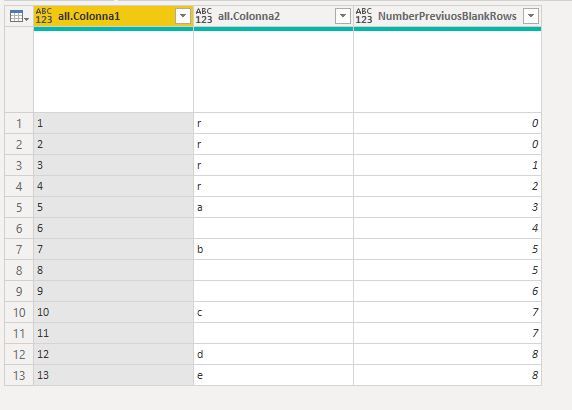
I'm sorry to say that it yet has a mistake when calculating on the first row if it's not blank.
I made this practical case as example:
let
    Origine = Table.FromRows(Json.Document(Binary.Decompress(Binary.FromText("i45WSlTSUUpJLUnMzFEoqSxIVTBUitXBFDXCKmoMEUUXNgELJ6GJmoJFgYJgOhmrteiiRih6UrDqScWrJw1TTywA", BinaryEncoding.Base64), Compression.Deflate)), let _t = ((type nullable text) meta [Serialized.Text = true]) in type table [Colonna2 = _t, Colonna1 = _t]),
    #"Raggruppate righe" = Table.Group(Origine, {"Colonna2"}, {{"all", each _}}, GroupKind.Local, (x,y)=>Number.From(y[Colonna2]="")),
    #"Aggiunta colonna indice" = Table.AddIndexColumn(#"Raggruppate righe", "Indice", 1, 1, Int64.Type),
    #"Rimosse colonne" = Table.RemoveColumns(#"Aggiunta colonna indice",{"Colonna2"}),
    te = Table.ExpandTableColumn(#"Rimosse colonne", "all", {"Colonna1", "Colonna2"}, {"all.Colonna1", "all.Colonna2"}),
    cpb={0}&(List.RemoveLastN(te[Indice],1)),
    tfc=Table.FromColumns(Table.ToColumns(te)&{cpb},Table.ColumnNames(te)&{"NumberPreviuosBlankRows"}),
    #"Rimosse colonne1" = Table.RemoveColumns(tfc,{"Indice"})
in
    #"Rimosse colonne1"
- Mark as New
- Bookmark
- Subscribe
- Mute
- Subscribe to RSS Feed
- Permalink
- Report Inappropriate Content
Helpful resources

Fabric Data Days 2026
Don't miss out on Data Days, June 15 through August 7. Learn Fabric, Power BI, SQL, AI and more.

Power BI DataViz World Championships - June 2026
A new Power BI DataViz World Championship is coming this June! Don't miss out on submitting your entry.

| User | Count |
|---|---|
| 3 | |
| 3 | |
| 2 | |
| 2 | |
| 1 |


| User | Count |
|---|---|
| 11 | |
| 9 | |
| 5 | |
| 4 | |
| 4 |


