Join us at FabCon Atlanta from March 16 - 20, 2026, for the ultimate Fabric, Power BI, AI and SQL community-led event. Save $200 with code FABCOMM.
Register now!The Power BI Data Visualization World Championships is back! Get ahead of the game and start preparing now! Learn more
In Power BI, I have a text column that contains what should be a duration, only it's in text format so I can not format it as a 'duration'. Examples are: "28 Hours", "5 Hours 20 Minutes", "1 Hour", "0 Seconds", and "50 Hours 1 Minute". So you'll see there's no consistent HH:MM:SS format. How do I convert the text to a proper duration format?
Solved! Go to Solution.
The #"Added Custom" step is the key one in the M provided. First convert your text column to lower case using that option on Transform/Format. Then on the Add Column tab, choose Custom Column and paste in the pop-up window.
let
hmslist = {{"hour", 24}, {"minute", 24*60}, {"second", 24*60*60}},
splittext = Text.Split([Result.u_time_actual_time], " "),
partialcombine = List.Transform(List.Split(splittext, 2), each Text.Combine(_)),
hms = let input = partialcombine in List.Transform(hmslist, (w)=> try Number.From(Text.Select(List.Select(input, (y)=> Text.Contains(y, w{0})){0}, {"0".."9"})) * (1/ w{1}) otherwise 0),
result = List.Sum(hms)
in
result
Pat
Here's one way to do it in the query editor. To see how it works, just create a blank query, open the Advanced Editor and replace the text there with the M code below.
let
Source = Table.FromRows(Json.Document(Binary.Decompress(Binary.FromText("i45WMrJQ8MgvLSpWitWJVjJVyACxFYwUcjPzSktSIaKGpjCugqGBQnFqcn5eClTGCKrBECqsFBsLAA==", BinaryEncoding.Base64), Compression.Deflate)), let _t = ((type nullable text) meta [Serialized.Text = true]) in type table [DurationAsText = _t]),
#"Changed Type" = Table.TransformColumnTypes(Source,{{"DurationAsText", type text}}),
#"Lowercased Text" = Table.TransformColumns(#"Changed Type",{{"DurationAsText", Text.Lower, type text}}),
#"Added Custom" = Table.AddColumn(#"Lowercased Text", "Duration", each let
hmslist = {{"hour", 24}, {"minute", 24*60}, {"second", 24*60*60}},
splittext = Text.Split([DurationAsText], " "),
partialcombine = List.Transform(List.Split(splittext, 2), each Text.Combine(_)),
hms = let input = partialcombine in List.Transform(hmslist, (w)=> try Number.From(Text.Select(List.Select(input, (y)=> Text.Contains(y, w{0})){0}, {"0".."9"})) * (1/ w{1}) otherwise 0),
result = List.Sum(hms)
in
result),
#"Changed Type1" = Table.TransformColumnTypes(#"Added Custom",{{"Duration", type duration}})
in
#"Changed Type1"
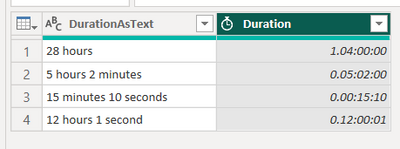
Pat
Thank you! Can you tell me how I can add a column to my existing table in power query? The column which contains the text is 'Result.u_time_actual_time'. Thanks!
The #"Added Custom" step is the key one in the M provided. First convert your text column to lower case using that option on Transform/Format. Then on the Add Column tab, choose Custom Column and paste in the pop-up window.
let
hmslist = {{"hour", 24}, {"minute", 24*60}, {"second", 24*60*60}},
splittext = Text.Split([Result.u_time_actual_time], " "),
partialcombine = List.Transform(List.Split(splittext, 2), each Text.Combine(_)),
hms = let input = partialcombine in List.Transform(hmslist, (w)=> try Number.From(Text.Select(List.Select(input, (y)=> Text.Contains(y, w{0})){0}, {"0".."9"})) * (1/ w{1}) otherwise 0),
result = List.Sum(hms)
in
result
Pat
The Power BI Data Visualization World Championships is back! Get ahead of the game and start preparing now!
Check out the November 2025 Power BI update to learn about new features.