This is best Fabric, Power BI, SQL and AI community event. How do we know? The last event sold out! Save €200 with code FABCMTY200.
Register nowJuly 28 - August 9 | Final Round of the Power BI Dataviz World Championships. This is your chance. Learn more
Hi,
I need help to convert this table:
| Name | Feb 2023 | Mar 2023 | Apr 2023 |
| Alex | xxx | xxx | xxx |
| Ben | xxx | xxx | xxx |
| Chris | xxx | xxx | xxx |
into this:
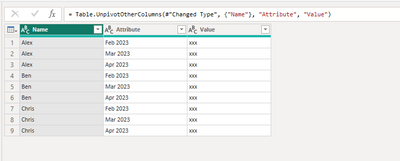
| Name | Month | Sales |
| Alex | Feb 2023 | xxx |
| Ben | Feb 2023 | xxx |
| Chris | Feb 2023 | xxx |
| Alex | Mar 2023 | xxx |
| Ben | Mar 2023 | xxx |
| Chris | Mar 2023 | xxx |
| Alex | Apr 2023 | xxx |
| Ben | Apr 2023 | xxx |
| Chris | Apr 2023 | xxx |
Before this, i use to copy paste manually and it took way too much time when we have way too much rows.
Thanks.
Solved! Go to Solution.
for that you have to unpivot the table,
select the "Feb 2023","Mar 2023","Apr 2023" columns and then select the option "unpivot only selected columns".
OR
select the "Name" column and then select the "unpivot other columns".
for that you have to unpivot the table,
select the "Feb 2023","Mar 2023","Apr 2023" columns and then select the option "unpivot only selected columns".
OR
select the "Name" column and then select the "unpivot other columns".
Hi,
To convert this table you need to unpivot(turns column into rows) it from Power Query Editor. Select the columns and right click >Unpivot.
Thank you.
If this post helps, then please consider Accept it as the solution and kudos to help the other members find it more quickly.
on transform data, try to use "Unpivot other column", then select only Name
Join us in Barcelona for FabCon and SQLCon, the Fabric, Power BI, SQL, and AI community event. Save €200 with code FABCMTY200.
If you love stickers, then you will definitely want to check out our community sticker challenge, Barcelona edition!
Check out the July 2026 Power BI update to learn about new features.
| User | Count |
|---|---|
| 3 | |
| 2 | |
| 2 | |
| 1 | |
| 1 |