This time we’re going bigger than ever. Fabric, Power BI, SQL, AI and more. We're covering it all. You won't want to miss it.
Learn moreLevel up your Power BI skills this month - build one visual each week and tell better stories with data! Get started
Hi All, wondering if anyone can help??
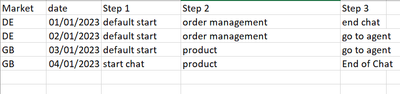
I have this set of date in this format
and what i want it to look like is this
Almost like an unpivot with the Step being the header, but not with values.
Any ideas anyone?
Solved! Go to Solution.
Hi @Anonymous ,
Here is my sample data:
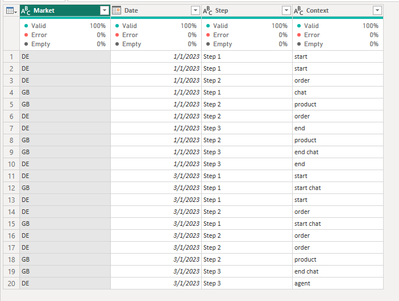
Please try this M function, just put all of the M function into the Advanced Editor:
let
Source = Table.FromRows(Json.Document(Binary.Decompress(Binary.FromText("i45WcnFV0lEy1DfUNzIwMgYyg0tSCxQMgYziksSiEqVYHfKVGAEZ+UUpqUVgJe5OOExJzkgswa0CZEhBUX5KaTLRNmFVAmKk5qUQbxFWRVBTFOBuJmgXWIEx3sAD24RTCZpd+I3CqgRLPJBrG5aAJsM2rEGNrgh7UGNTlZiemgdUEgsA", BinaryEncoding.Base64), Compression.Deflate)), let _t = ((type nullable text) meta [Serialized.Text = true]) in type table [Market = _t, Date = _t, Step = _t, Context = _t]),
#"Changed Type" = Table.TransformColumnTypes(Source,{{"Market", type text}, {"Date", type date}, {"Step", type text}, {"Context", type text}}),
#"Removed Duplicates" = Table.Distinct(#"Changed Type"),
#"Pivoted Column" = Table.Pivot(#"Removed Duplicates", List.Distinct(#"Removed Duplicates"[Step]), "Step", "Context")
in
#"Pivoted Column"
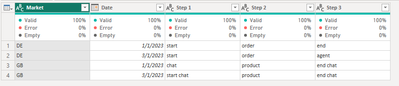
And the final output is as below:
Best Regards,
Dino Tao
If this post helps, then please consider Accept it as the solution to help the other members find it more quickly.
Hi @Anonymous ,
Here is my sample data:
Please try this M function, just put all of the M function into the Advanced Editor:
let
Source = Table.FromRows(Json.Document(Binary.Decompress(Binary.FromText("i45WcnFV0lEy1DfUNzIwMgYyg0tSCxQMgYziksSiEqVYHfKVGAEZ+UUpqUVgJe5OOExJzkgswa0CZEhBUX5KaTLRNmFVAmKk5qUQbxFWRVBTFOBuJmgXWIEx3sAD24RTCZpd+I3CqgRLPJBrG5aAJsM2rEGNrgh7UGNTlZiemgdUEgsA", BinaryEncoding.Base64), Compression.Deflate)), let _t = ((type nullable text) meta [Serialized.Text = true]) in type table [Market = _t, Date = _t, Step = _t, Context = _t]),
#"Changed Type" = Table.TransformColumnTypes(Source,{{"Market", type text}, {"Date", type date}, {"Step", type text}, {"Context", type text}}),
#"Removed Duplicates" = Table.Distinct(#"Changed Type"),
#"Pivoted Column" = Table.Pivot(#"Removed Duplicates", List.Distinct(#"Removed Duplicates"[Step]), "Step", "Context")
in
#"Pivoted Column"
And the final output is as below:
Best Regards,
Dino Tao
If this post helps, then please consider Accept it as the solution to help the other members find it more quickly.
Hi @Anonymous,
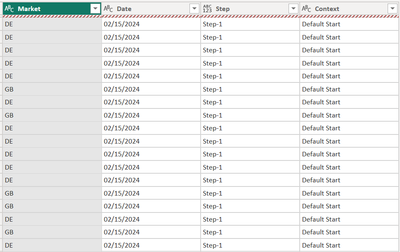
Thanks but this doesnt work with the additional columns for country and date
Check out the April 2026 Power BI update to learn about new features.
Sign up to receive a private message when registration opens and key events begin.
If you have recently started exploring Fabric, we'd love to hear how it's going. Your feedback can help with product improvements.