Join us at FabCon Atlanta from March 16 - 20, 2026, for the ultimate Fabric, Power BI, AI and SQL community-led event. Save $200 with code FABCOMM.
Register now!The Power BI Data Visualization World Championships is back! Get ahead of the game and start preparing now! Learn more
Hi All, wondering if anyone can help??
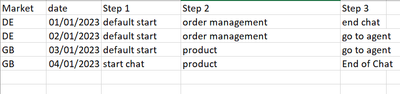
I have this set of date in this format
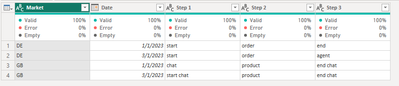
and what i want it to look like is this
Almost like an unpivot with the Step being the header, but not with values.
Any ideas anyone?
Solved! Go to Solution.
Hi @Anonymous ,
Here is my sample data:
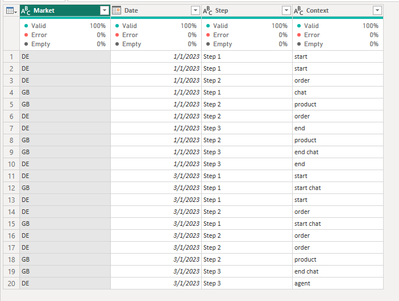
Please try this M function, just put all of the M function into the Advanced Editor:
let
Source = Table.FromRows(Json.Document(Binary.Decompress(Binary.FromText("i45WcnFV0lEy1DfUNzIwMgYyg0tSCxQMgYziksSiEqVYHfKVGAEZ+UUpqUVgJe5OOExJzkgswa0CZEhBUX5KaTLRNmFVAmKk5qUQbxFWRVBTFOBuJmgXWIEx3sAD24RTCZpd+I3CqgRLPJBrG5aAJsM2rEGNrgh7UGNTlZiemgdUEgsA", BinaryEncoding.Base64), Compression.Deflate)), let _t = ((type nullable text) meta [Serialized.Text = true]) in type table [Market = _t, Date = _t, Step = _t, Context = _t]),
#"Changed Type" = Table.TransformColumnTypes(Source,{{"Market", type text}, {"Date", type date}, {"Step", type text}, {"Context", type text}}),
#"Removed Duplicates" = Table.Distinct(#"Changed Type"),
#"Pivoted Column" = Table.Pivot(#"Removed Duplicates", List.Distinct(#"Removed Duplicates"[Step]), "Step", "Context")
in
#"Pivoted Column"
And the final output is as below:
Best Regards,
Dino Tao
If this post helps, then please consider Accept it as the solution to help the other members find it more quickly.
Hi @Anonymous ,
Here is my sample data:
Please try this M function, just put all of the M function into the Advanced Editor:
let
Source = Table.FromRows(Json.Document(Binary.Decompress(Binary.FromText("i45WcnFV0lEy1DfUNzIwMgYyg0tSCxQMgYziksSiEqVYHfKVGAEZ+UUpqUVgJe5OOExJzkgswa0CZEhBUX5KaTLRNmFVAmKk5qUQbxFWRVBTFOBuJmgXWIEx3sAD24RTCZpd+I3CqgRLPJBrG5aAJsM2rEGNrgh7UGNTlZiemgdUEgsA", BinaryEncoding.Base64), Compression.Deflate)), let _t = ((type nullable text) meta [Serialized.Text = true]) in type table [Market = _t, Date = _t, Step = _t, Context = _t]),
#"Changed Type" = Table.TransformColumnTypes(Source,{{"Market", type text}, {"Date", type date}, {"Step", type text}, {"Context", type text}}),
#"Removed Duplicates" = Table.Distinct(#"Changed Type"),
#"Pivoted Column" = Table.Pivot(#"Removed Duplicates", List.Distinct(#"Removed Duplicates"[Step]), "Step", "Context")
in
#"Pivoted Column"
And the final output is as below:
Best Regards,
Dino Tao
If this post helps, then please consider Accept it as the solution to help the other members find it more quickly.
Hi @Anonymous,
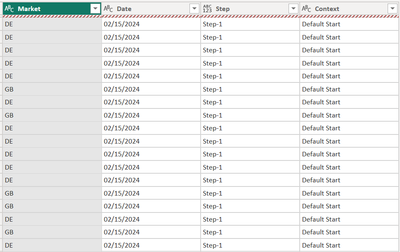
Thanks but this doesnt work with the additional columns for country and date
The Power BI Data Visualization World Championships is back! Get ahead of the game and start preparing now!
| User | Count |
|---|---|
| 19 | |
| 10 | |
| 9 | |
| 7 | |
| 6 |