Join us at FabCon Atlanta from March 16 - 20, 2026, for the ultimate Fabric, Power BI, AI and SQL community-led event. Save $200 with code FABCOMM.
Register now!The Power BI Data Visualization World Championships is back! It's time to submit your entry. Live now!
Hi All, wondering if anyone can help??
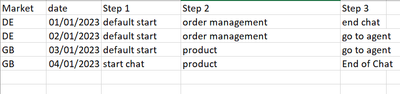
I have this set of date in this format
and what i want it to look like is this
Almost like an unpivot with the Step being the header, but not with values.
Any ideas anyone?
Solved! Go to Solution.
Hi @Anonymous ,
Here is my sample data:
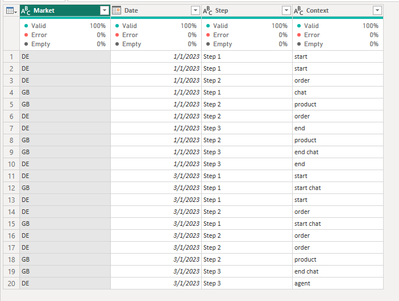
Please try this M function, just put all of the M function into the Advanced Editor:
let
Source = Table.FromRows(Json.Document(Binary.Decompress(Binary.FromText("i45WcnFV0lEy1DfUNzIwMgYyg0tSCxQMgYziksSiEqVYHfKVGAEZ+UUpqUVgJe5OOExJzkgswa0CZEhBUX5KaTLRNmFVAmKk5qUQbxFWRVBTFOBuJmgXWIEx3sAD24RTCZpd+I3CqgRLPJBrG5aAJsM2rEGNrgh7UGNTlZiemgdUEgsA", BinaryEncoding.Base64), Compression.Deflate)), let _t = ((type nullable text) meta [Serialized.Text = true]) in type table [Market = _t, Date = _t, Step = _t, Context = _t]),
#"Changed Type" = Table.TransformColumnTypes(Source,{{"Market", type text}, {"Date", type date}, {"Step", type text}, {"Context", type text}}),
#"Removed Duplicates" = Table.Distinct(#"Changed Type"),
#"Pivoted Column" = Table.Pivot(#"Removed Duplicates", List.Distinct(#"Removed Duplicates"[Step]), "Step", "Context")
in
#"Pivoted Column"
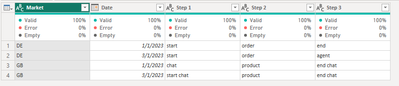
And the final output is as below:
Best Regards,
Dino Tao
If this post helps, then please consider Accept it as the solution to help the other members find it more quickly.
Hi @Anonymous ,
Here is my sample data:
Please try this M function, just put all of the M function into the Advanced Editor:
let
Source = Table.FromRows(Json.Document(Binary.Decompress(Binary.FromText("i45WcnFV0lEy1DfUNzIwMgYyg0tSCxQMgYziksSiEqVYHfKVGAEZ+UUpqUVgJe5OOExJzkgswa0CZEhBUX5KaTLRNmFVAmKk5qUQbxFWRVBTFOBuJmgXWIEx3sAD24RTCZpd+I3CqgRLPJBrG5aAJsM2rEGNrgh7UGNTlZiemgdUEgsA", BinaryEncoding.Base64), Compression.Deflate)), let _t = ((type nullable text) meta [Serialized.Text = true]) in type table [Market = _t, Date = _t, Step = _t, Context = _t]),
#"Changed Type" = Table.TransformColumnTypes(Source,{{"Market", type text}, {"Date", type date}, {"Step", type text}, {"Context", type text}}),
#"Removed Duplicates" = Table.Distinct(#"Changed Type"),
#"Pivoted Column" = Table.Pivot(#"Removed Duplicates", List.Distinct(#"Removed Duplicates"[Step]), "Step", "Context")
in
#"Pivoted Column"
And the final output is as below:
Best Regards,
Dino Tao
If this post helps, then please consider Accept it as the solution to help the other members find it more quickly.
Hi @Anonymous,
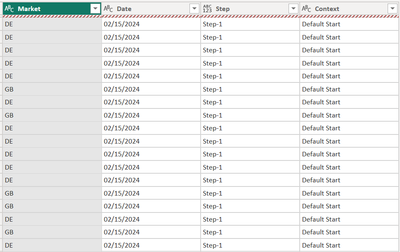
Thanks but this doesnt work with the additional columns for country and date
The Power BI Data Visualization World Championships is back! It's time to submit your entry.
| User | Count |
|---|---|
| 16 | |
| 9 | |
| 8 | |
| 7 | |
| 7 |