Don't miss your chance to take the Fabric Data Engineer (DP-600) exam for FREE! Find out how by watching the DP-600 session on-demand now through April 28th.
Learn moreJoin the FabCon + SQLCon recap series. Up next: Power BI, Real-Time Intelligence, IQ and AI, and Data Factory take center stage. All sessions are available on-demand after the live show. Register now
Hi there,
How can I convert bigint datatype to date/time datatype in Power BI ?
Thanks
Solved! Go to Solution.
Hi @suvechha ,
If it is timestamp, maybe you could try this as well in Query Editor.
DateTimedValue=#datetime(1970,1,1,0,0,0)+#duration(0,0,0,[timestamp])
If it is formated as yyyymmdd, you could try this in Data View:
column = DATE(LEFT('Table 1'[Column1],4),MID('Table 1'[Column1],5,2),RIGHT('Table 1'[Column1],2))
Hi @suvechha ,
If it is timestamp, maybe you could try this as well in Query Editor.
DateTimedValue=#datetime(1970,1,1,0,0,0)+#duration(0,0,0,[timestamp])
If it is formated as yyyymmdd, you could try this in Data View:
column = DATE(LEFT('Table 1'[Column1],4),MID('Table 1'[Column1],5,2),RIGHT('Table 1'[Column1],2))
bigint isn't a date time field, it is an integer. Need to know what is in the integer. If it is the YYYYMMDD format, then there are a lot of ways to convert, but:
Date.FromText(Text.From([BigIntField]))
is the easiest and most straight forward way.
It could also be a Julian date (common in IBM databases), or Unix Epoch, or other. We'd need to know more as there isn't just one date format stored in integer fields.
DAX is for Analysis. Power Query is for Data Modeling
Proud to be a Super User!
MCSA: BI Reportingit depends on what your time format is? epoch, excel ??
can you provide an example?
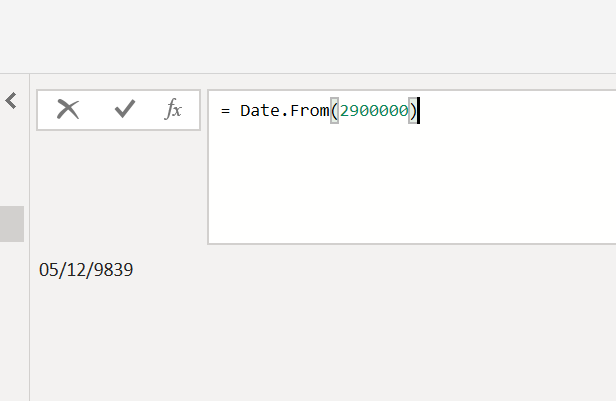
peraphs he is refering to the function
date.from(value)
Yeah @Anonymous it is hard to know what exactly is being asked. Date.From converts the standard Excel style date (integer starting at 0 for Dec 31, 1899) to a date. I've never used that. Just changing the type from Int to Date does that. But I could see it being useful if nested in another formula.
DAX is for Analysis. Power Query is for Data Modeling
Proud to be a Super User!
MCSA: BI ReportingCheck out the April 2026 Power BI update to learn about new features.
If you have recently started exploring Fabric, we'd love to hear how it's going. Your feedback can help with product improvements.
A new Power BI DataViz World Championship is coming this June! Don't miss out on submitting your entry.
| User | Count |
|---|---|
| 3 | |
| 3 | |
| 3 | |
| 2 | |
| 2 |
| User | Count |
|---|---|
| 8 | |
| 6 | |
| 5 | |
| 5 | |
| 4 |