cancel
Showing results for 
Search instead for 
Did you mean: 

The Power BI Data Visualization World Championships is back! Get ahead of the game and start preparing now! Learn more

Reply
suvechha
Helper IV
Helper IV

Convert bigint to datetime

Hi there,


How can I convert bigint datatype to date/time datatype in Power BI ?


Thanks

1 ACCEPTED SOLUTION
v-xuding-msft
Community Support
Community Support

Hi @suvechha ,


If it is timestamp, maybe you could try this as well in Query Editor.

DateTimedValue=#datetime(1970,1,1,0,0,0)+#duration(0,0,0,[timestamp])


If it is formated as yyyymmdd, you could try this in Data View:

column = DATE(LEFT('Table 1'[Column1],4),MID('Table 1'[Column1],5,2),RIGHT('Table 1'[Column1],2))


Best Regards,
Xue Ding
If this post helps, then please consider Accept it as the solution to help the other members find it more quickly.

View solution in original post

5 REPLIES 5
v-xuding-msft
Community Support
Community Support

Hi @suvechha ,


If it is timestamp, maybe you could try this as well in Query Editor.

DateTimedValue=#datetime(1970,1,1,0,0,0)+#duration(0,0,0,[timestamp])


If it is formated as yyyymmdd, you could try this in Data View:

column = DATE(LEFT('Table 1'[Column1],4),MID('Table 1'[Column1],5,2),RIGHT('Table 1'[Column1],2))


Best Regards,
Xue Ding
If this post helps, then please consider Accept it as the solution to help the other members find it more quickly.
edhans
Community Champion
Community Champion

bigint isn't a date time field, it is an integer. Need to know what is in the integer. If it is the YYYYMMDD format, then there are a lot of ways to convert, but:

Date.FromText(Text.From([BigIntField]))

is the easiest and most straight forward way.

It could also be a Julian date (common in IBM databases), or Unix Epoch, or other. We'd need to know more as there isn't just one date format stored in integer fields.


Did I answer your question? Mark my post as a solution!
Did my answers help arrive at a solution? Give it a kudos by clicking the Thumbs Up!

DAX is for Analysis. Power Query is for Data Modeling


Proud to be a Super User!

MCSA: BI Reporting
fuglphoenix
Frequent Visitor

it depends on what your time format is? epoch, excel ??

can you provide an example?

Anonymous
Not applicable

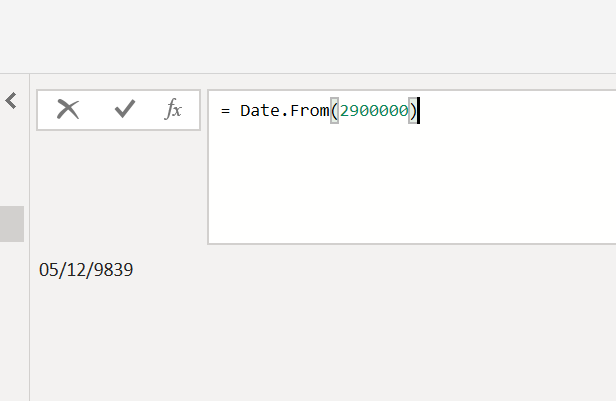
peraphs he is refering to the function


date.from(value)


image.png


edhans
Community Champion
Community Champion

Yeah @Anonymous it is hard to know what exactly is being asked. Date.From converts the standard Excel style date (integer starting at 0 for Dec 31, 1899) to a date. I've never used that. Just changing the type from Int to Date does that. But I could see it being useful if nested in another formula.


Did I answer your question? Mark my post as a solution!
Did my answers help arrive at a solution? Give it a kudos by clicking the Thumbs Up!

DAX is for Analysis. Power Query is for Data Modeling


Proud to be a Super User!

MCSA: BI Reporting

Helpful resources

Announcements
Power BI DataViz World Championships

Power BI Dataviz World Championships

The Power BI Data Visualization World Championships is back! Get ahead of the game and start preparing now!

December 2025 Power BI Update Carousel

Power BI Monthly Update - December 2025

Check out the December 2025 Power BI Holiday Recap!

FabCon Atlanta 2026 carousel

FabCon Atlanta 2026

Join us at FabCon Atlanta, March 16-20, for the ultimate Fabric, Power BI, AI and SQL community-led event. Save $200 with code FABCOMM.

Top Solution Authors