
Don't miss your chance to take the Fabric Data Engineer (DP-700) exam on us!
Learn moreNext up in the FabCon + SQLCon recap series: The roadmap for Microsoft SQL and Maximizing Developer experiences in Fabric. All sessions are available on-demand after the live show. Register now
Hello,
My task is to calculate price of a material based on a shipment date.
As price in the past changed several times thus I have to connect single date of shipment with material price from that period of time. In my shipment table I have single column with dates but in material costs table I have two columns with dates (Valid from/ Valid to). Is there anyway to connect these dates somehow ?
Solved! Go to Solution.
Hi @Anonymous
Suppose you have two tables like below and you want to add a price column to the Shipment table according to the prices in Costs table based on a corresponding price period.
You can copy and paste below codes into a blank query's Advanced Editor to create a function. I call this function FindPrice. It will find a price from Costs table according to a provided parameter OrderDate.
(OrderDate)=>
let
Source = Costs,
Custom1 = Table.SelectRows(Source,each [Valid From] <= OrderDate and [Valid To] >= OrderDate){0}[Price]
in
Custom1
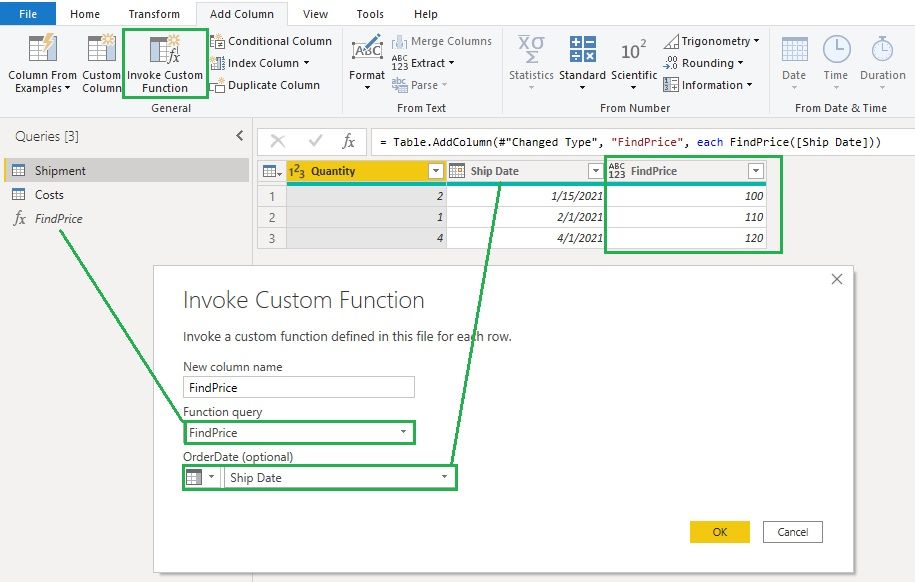
In Shipment table, click on Invoke Custom Function to add a column and use the FindPrice function and Ship Date column to invoke this function to get the prices.
Hope this helps.
Community Support Team _ Jing
If this post helps, please Accept it as the solution to help other members find it.
Hi @Anonymous
Suppose you have two tables like below and you want to add a price column to the Shipment table according to the prices in Costs table based on a corresponding price period.
You can copy and paste below codes into a blank query's Advanced Editor to create a function. I call this function FindPrice. It will find a price from Costs table according to a provided parameter OrderDate.
(OrderDate)=>
let
Source = Costs,
Custom1 = Table.SelectRows(Source,each [Valid From] <= OrderDate and [Valid To] >= OrderDate){0}[Price]
in
Custom1
In Shipment table, click on Invoke Custom Function to add a column and use the FindPrice function and Ship Date column to invoke this function to get the prices.
Hope this helps.
Community Support Team _ Jing
If this post helps, please Accept it as the solution to help other members find it.
Something like:
Table.AddColumn(myTable, "OrigionalCost", (myTableRow) => Table.SelectRows(ShipmentTable, (shipRow) => shipRow[ValidTo] <= myTableRow[OrderDate] and shipRow[ValidFrom] > myTableRow[OrderDate]){0}?[Cost])
If you have recently started exploring Fabric, we'd love to hear how it's going. Your feedback can help with product improvements.
A new Power BI DataViz World Championship is coming this June! Don't miss out on submitting your entry.
Share feedback directly with Fabric product managers, participate in targeted research studies and influence the Fabric roadmap.
| User | Count |
|---|---|
| 6 | |
| 4 | |
| 3 | |
| 3 | |
| 2 |
| User | Count |
|---|---|
| 7 | |
| 6 | |
| 5 | |
| 5 | |
| 5 |