
Join us at FabCon Atlanta from March 16 - 20, 2026, for the ultimate Fabric, Power BI, AI and SQL community-led event. Save $200 with code FABCOMM.
Register now!The Power BI Data Visualization World Championships is back! It's time to submit your entry. Live now!
Hello,
My task is to calculate price of a material based on a shipment date.
As price in the past changed several times thus I have to connect single date of shipment with material price from that period of time. In my shipment table I have single column with dates but in material costs table I have two columns with dates (Valid from/ Valid to). Is there anyway to connect these dates somehow ?
Solved! Go to Solution.
Hi @Anonymous
Suppose you have two tables like below and you want to add a price column to the Shipment table according to the prices in Costs table based on a corresponding price period.
You can copy and paste below codes into a blank query's Advanced Editor to create a function. I call this function FindPrice. It will find a price from Costs table according to a provided parameter OrderDate.
(OrderDate)=>
let
Source = Costs,
Custom1 = Table.SelectRows(Source,each [Valid From] <= OrderDate and [Valid To] >= OrderDate){0}[Price]
in
Custom1
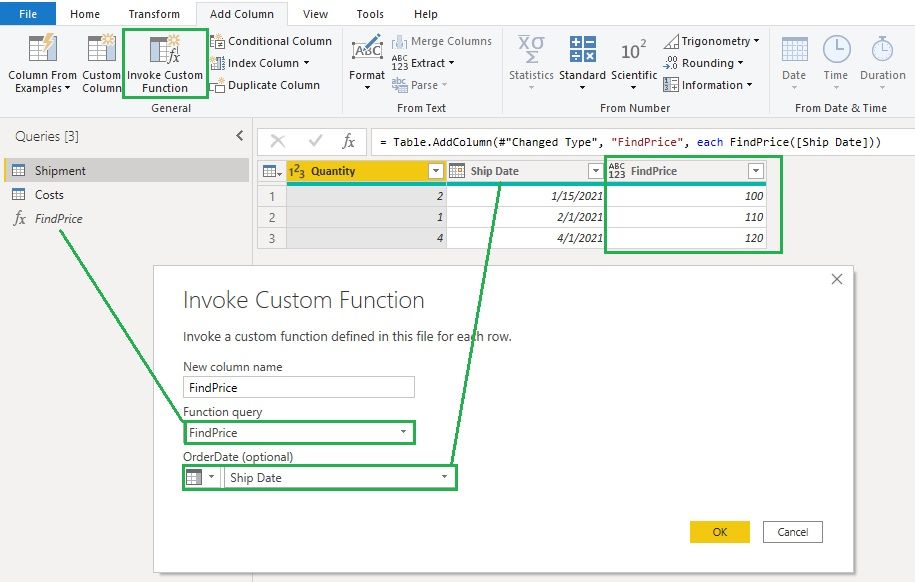
In Shipment table, click on Invoke Custom Function to add a column and use the FindPrice function and Ship Date column to invoke this function to get the prices.
Hope this helps.
Community Support Team _ Jing
If this post helps, please Accept it as the solution to help other members find it.
Hi @Anonymous
Suppose you have two tables like below and you want to add a price column to the Shipment table according to the prices in Costs table based on a corresponding price period.
You can copy and paste below codes into a blank query's Advanced Editor to create a function. I call this function FindPrice. It will find a price from Costs table according to a provided parameter OrderDate.
(OrderDate)=>
let
Source = Costs,
Custom1 = Table.SelectRows(Source,each [Valid From] <= OrderDate and [Valid To] >= OrderDate){0}[Price]
in
Custom1
In Shipment table, click on Invoke Custom Function to add a column and use the FindPrice function and Ship Date column to invoke this function to get the prices.
Hope this helps.
Community Support Team _ Jing
If this post helps, please Accept it as the solution to help other members find it.
Something like:
Table.AddColumn(myTable, "OrigionalCost", (myTableRow) => Table.SelectRows(ShipmentTable, (shipRow) => shipRow[ValidTo] <= myTableRow[OrderDate] and shipRow[ValidFrom] > myTableRow[OrderDate]){0}?[Cost])
| User | Count |
|---|---|
| 19 | |
| 13 | |
| 9 | |
| 8 | |
| 7 |