cancel
Showing results for 
Search instead for 
Did you mean: 

July 7 - July 17 | Round 2 of the Power BI Dataviz World Championships. Don't miss your chance! Learn more

Reply
cheezee
Regular Visitor

Connecting to ODBC Datasource using SQL Statement

Hello guys,


I'm trying to connect to an Oracle database (that has over 300,000 objects within a certain schema) by using an ODBC connector. Reason being, the Oracle database is hosted in a UNIX environment and I am connecting to it from Windows Server.


Please, how can I connect to a table/view that is not listed within the first 10,000 preview results in the Navigator window, say by querying the exact table using a SQL statement? 


Alternatively, is there any other method of connecting to this table  (using Blank Query, for example)?


Any answer at all will be appreciated. Thanks

1 ACCEPTED SOLUTION
Anonymous
Not applicable

@cheezee,

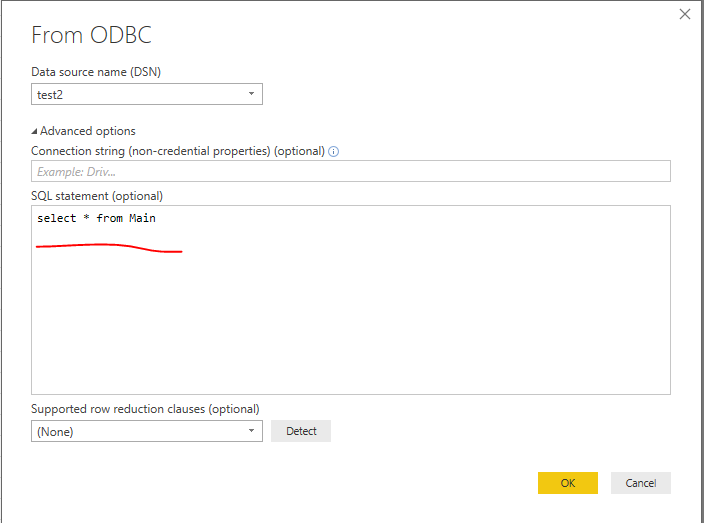
Option1:

Write SQL statement in Power BI Desktop.
1.PNG

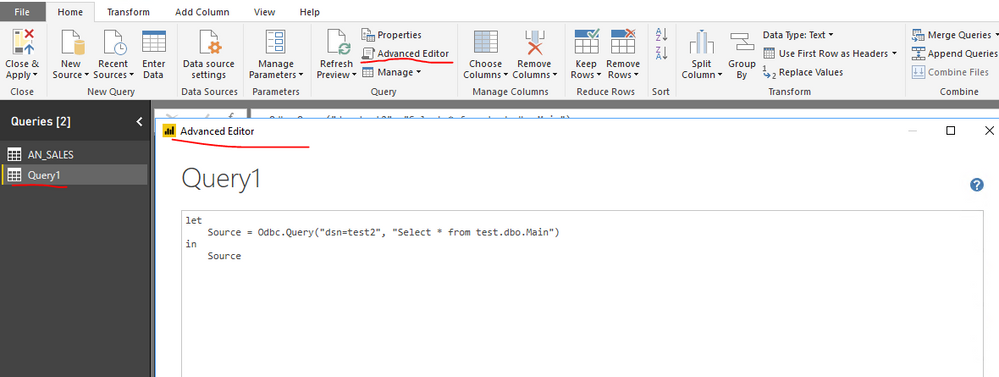
Option2:

Add a blank query in Power BI Desktop, paste the following code into Advanced Editor of the blank query.

let
    Source = Odbc.Query("dsn=yourdsn", "Select * from yourtable")
in
    Source


2.PNG

Regards,
Lydia

View solution in original post

2 REPLIES 2
Anonymous
Not applicable

@cheezee,

Option1:

Write SQL statement in Power BI Desktop.
1.PNG

Option2:

Add a blank query in Power BI Desktop, paste the following code into Advanced Editor of the blank query.

let
    Source = Odbc.Query("dsn=yourdsn", "Select * from yourtable")
in
    Source


2.PNG

Regards,
Lydia

Thanks Lydia,


I'll try this out and see how it goes. I believe this should solve my problem. Smiley Happy

Helpful resources

Announcements
FabCon and SQLCon Barcelona 2026

FabCon & SQLCon – Barcelona 2026

Join us in Barcelona for FabCon and SQLCon, the Fabric, Power BI, SQL, and AI community event. Save €200 with code FABCMTY200.

July Power BI Update Carousel

Power BI Monthly Update - July 2026

Check out the July 2026 Power BI update to learn about new features.

60 days of Data Days Carousel

Data Days 2026

Join Data Days 2026: 60 days of free live/on-demand sessions, challenges, study groups, and certification opportunities.

Power BI DataViz World Championships carousel

Power BI DataViz World Championships - June 2026

A new Power BI DataViz World Championship is coming this June! Don't miss out on submitting your entry.

Top Solution Authors