Don't miss your chance to take exam DP-600 or DP-700 on us!
Request nowLearn from the best! Meet the four finalists headed to the FINALS of the Power BI Dataviz World Championships! Register now
Hello guys,
I'm trying to connect to an Oracle database (that has over 300,000 objects within a certain schema) by using an ODBC connector. Reason being, the Oracle database is hosted in a UNIX environment and I am connecting to it from Windows Server.
Please, how can I connect to a table/view that is not listed within the first 10,000 preview results in the Navigator window, say by querying the exact table using a SQL statement?
Alternatively, is there any other method of connecting to this table (using Blank Query, for example)?
Any answer at all will be appreciated. Thanks
Solved! Go to Solution.
@cheezee,
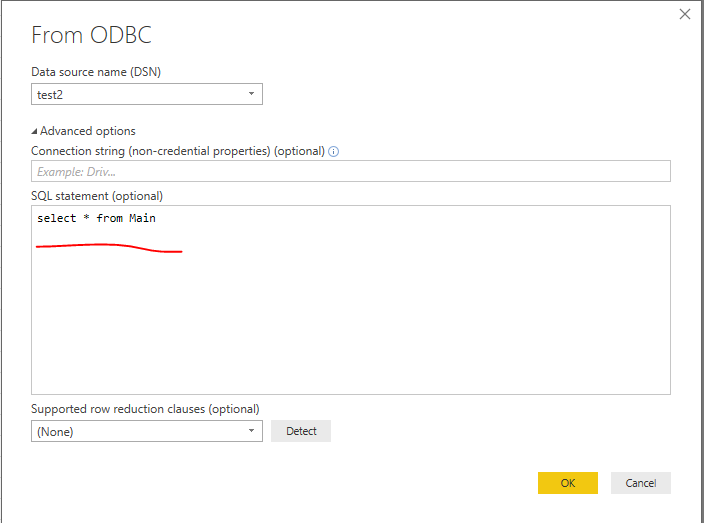
Option1:
Write SQL statement in Power BI Desktop.
Option2:
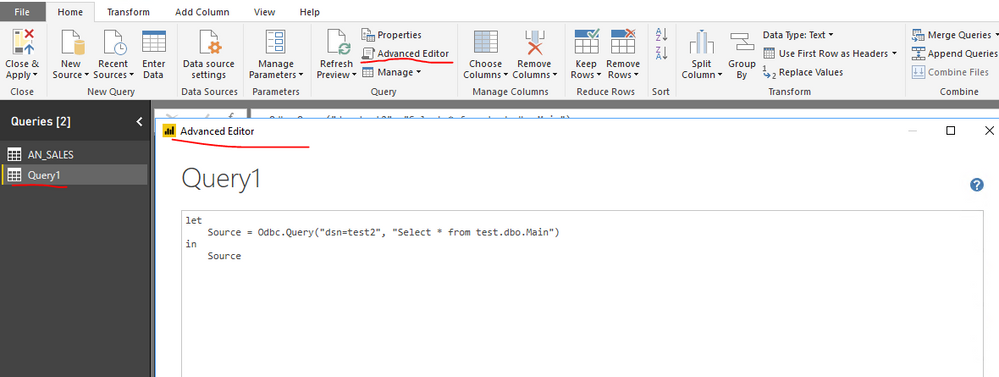
Add a blank query in Power BI Desktop, paste the following code into Advanced Editor of the blank query.
let
Source = Odbc.Query("dsn=yourdsn", "Select * from yourtable")
in
Source
Regards,
Lydia
@cheezee,
Option1:
Write SQL statement in Power BI Desktop.
Option2:
Add a blank query in Power BI Desktop, paste the following code into Advanced Editor of the blank query.
let
Source = Odbc.Query("dsn=yourdsn", "Select * from yourtable")
in
Source
Regards,
Lydia
Thanks Lydia,
I'll try this out and see how it goes. I believe this should solve my problem. ![]()
Share feedback directly with Fabric product managers, participate in targeted research studies and influence the Fabric roadmap.
Check out the February 2026 Power BI update to learn about new features.
| User | Count |
|---|---|
| 9 | |
| 9 | |
| 8 | |
| 8 | |
| 6 |