Don't miss your chance to take the Fabric Data Engineer (DP-600) exam for FREE! Find out how by attending the DP-600 session on April 23rd (pacific time), live or on-demand.
Learn moreNext up in the FabCon + SQLCon recap series: The roadmap for Microsoft SQL and Maximizing Developer experiences in Fabric. All sessions are available on-demand after the live show. Register now
Hello guys,
I'm trying to connect to an Oracle database (that has over 300,000 objects within a certain schema) by using an ODBC connector. Reason being, the Oracle database is hosted in a UNIX environment and I am connecting to it from Windows Server.
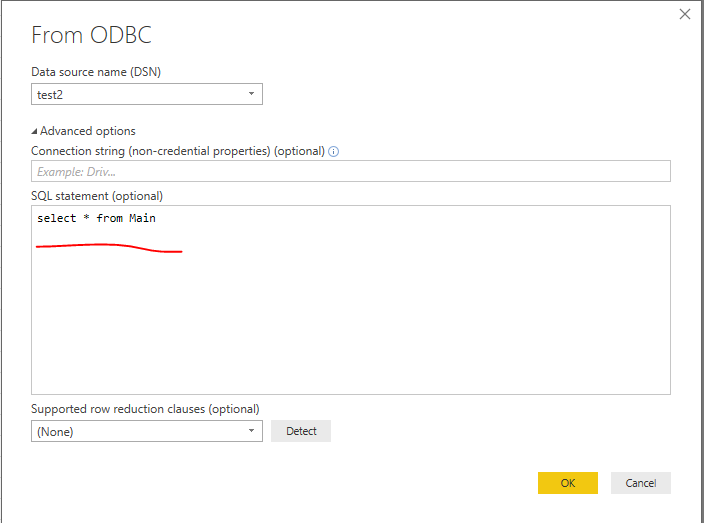
Please, how can I connect to a table/view that is not listed within the first 10,000 preview results in the Navigator window, say by querying the exact table using a SQL statement?
Alternatively, is there any other method of connecting to this table (using Blank Query, for example)?
Any answer at all will be appreciated. Thanks
Solved! Go to Solution.
@cheezee,
Option1:
Write SQL statement in Power BI Desktop.
Option2:
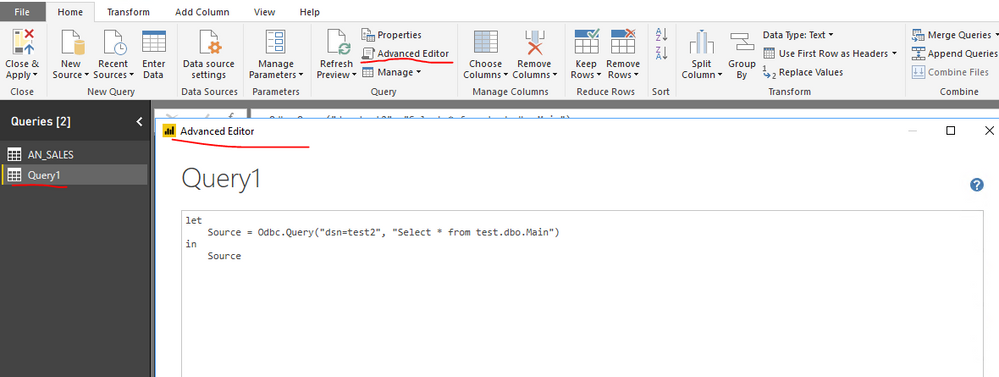
Add a blank query in Power BI Desktop, paste the following code into Advanced Editor of the blank query.
let
Source = Odbc.Query("dsn=yourdsn", "Select * from yourtable")
in
Source
Regards,
Lydia
@cheezee,
Option1:
Write SQL statement in Power BI Desktop.
Option2:
Add a blank query in Power BI Desktop, paste the following code into Advanced Editor of the blank query.
let
Source = Odbc.Query("dsn=yourdsn", "Select * from yourtable")
in
Source
Regards,
Lydia
Thanks Lydia,
I'll try this out and see how it goes. I believe this should solve my problem. ![]()
If you have recently started exploring Fabric, we'd love to hear how it's going. Your feedback can help with product improvements.
A new Power BI DataViz World Championship is coming this June! Don't miss out on submitting your entry.
Experience the highlights from FabCon & SQLCon, available live and on-demand starting April 14th.
| User | Count |
|---|---|
| 5 | |
| 3 | |
| 3 | |
| 3 | |
| 2 |
| User | Count |
|---|---|
| 7 | |
| 5 | |
| 5 | |
| 5 | |
| 4 |