Join us at FabCon Atlanta from March 16 - 20, 2026, for the ultimate Fabric, Power BI, AI and SQL community-led event. Save $200 with code FABCOMM.
Register now!The Power BI Data Visualization World Championships is back! Get ahead of the game and start preparing now! Learn more
Hello guys,
I'm trying to connect to an Oracle database (that has over 300,000 objects within a certain schema) by using an ODBC connector. Reason being, the Oracle database is hosted in a UNIX environment and I am connecting to it from Windows Server.
Please, how can I connect to a table/view that is not listed within the first 10,000 preview results in the Navigator window, say by querying the exact table using a SQL statement?
Alternatively, is there any other method of connecting to this table (using Blank Query, for example)?
Any answer at all will be appreciated. Thanks
Solved! Go to Solution.
@cheezee,
Option1:
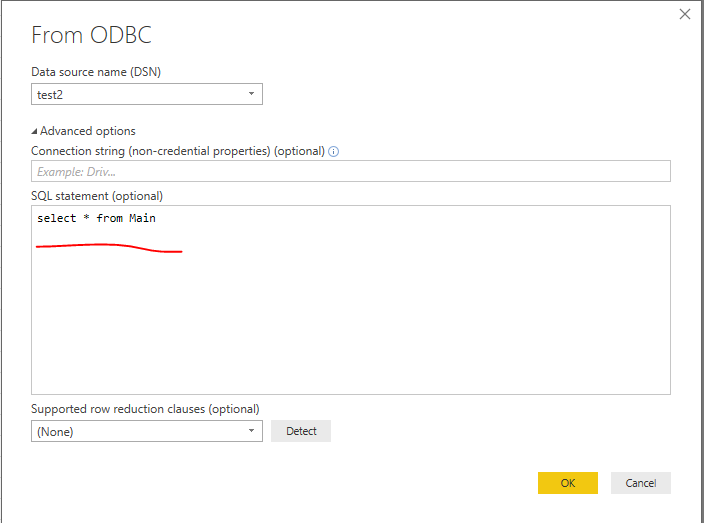
Write SQL statement in Power BI Desktop.
Option2:
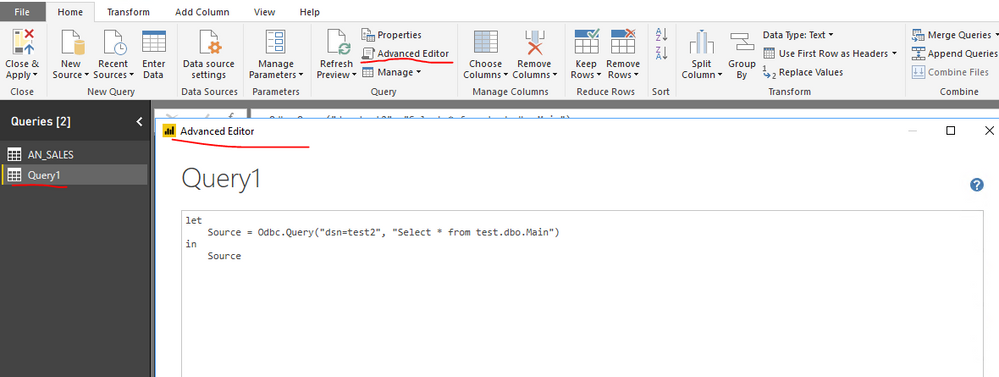
Add a blank query in Power BI Desktop, paste the following code into Advanced Editor of the blank query.
let
Source = Odbc.Query("dsn=yourdsn", "Select * from yourtable")
in
Source
Regards,
Lydia
@cheezee,
Option1:
Write SQL statement in Power BI Desktop.
Option2:
Add a blank query in Power BI Desktop, paste the following code into Advanced Editor of the blank query.
let
Source = Odbc.Query("dsn=yourdsn", "Select * from yourtable")
in
Source
Regards,
Lydia
Thanks Lydia,
I'll try this out and see how it goes. I believe this should solve my problem. ![]()
The Power BI Data Visualization World Championships is back! Get ahead of the game and start preparing now!