This time we’re going bigger than ever. Fabric, Power BI, SQL, AI and more. We're covering it all. You won't want to miss it.
Learn moreDid you hear? There's a new SQL AI Developer certification (DP-800). Start preparing now and be one of the first to get certified. Register now
Hi,
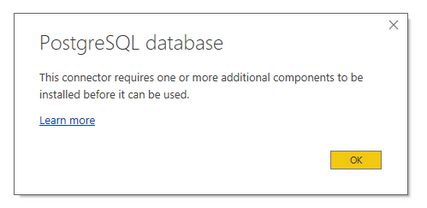
I need to get data from PostgreSQL data base, but when I choose this option in Power BI desktop I get this message :
After installation of Npgsql the problem stays the same.
@Marcin,
What version of Npgsql do you install? And do you connect to the PostgreSQL database in the latest version of Power BI Desktop(2.50.4859.782)?
In my environment, I installed Npgsql 3.1.8 and there is no issues when I connect to PostgreSQL in 32 bit Power BI Desktop.
Regards,
Lydia
Hi,
I have lastest Version: 2.50.4859.782 64-bit (September 2017) of Power BI.
Npgsql version 3.2.5 and it didn't help.
I found this solution which helped but is not easy to implement :
http://www.cloudfronts.com/power-bi-connectivity-to-postgresql/
@Marcin,
Please install Npgsql 3.1.8 and 32 bit Power BI Desktop instead, then check if you can connect to postgresql database.
Regards,
Lydia
Check out the April 2026 Power BI update to learn about new features.
Sign up to receive a private message when registration opens and key events begin.
If you have recently started exploring Fabric, we'd love to hear how it's going. Your feedback can help with product improvements.
| User | Count |
|---|---|
| 3 | |
| 3 | |
| 3 | |
| 2 | |
| 2 |