Don't miss your chance to take the Fabric Data Engineer (DP-600) exam for FREE! Find out how by attending the DP-600 session on April 23rd (pacific time), live or on-demand.
Learn moreNext up in the FabCon + SQLCon recap series: The roadmap for Microsoft SQL and Maximizing Developer experiences in Fabric. All sessions are available on-demand after the live show. Register now
Hello guys, I'm newbie to PowerBI and I need some logical help.
I want to count each unique row value as '1' or if duplicate '0". Would appreciate your help.
Thanks,
James
Solved! Go to Solution.
Hi, hope this helps
In Transform Data:
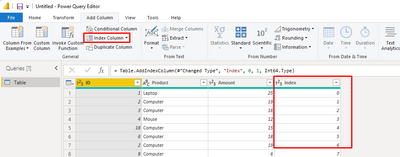
Add index starting from 0
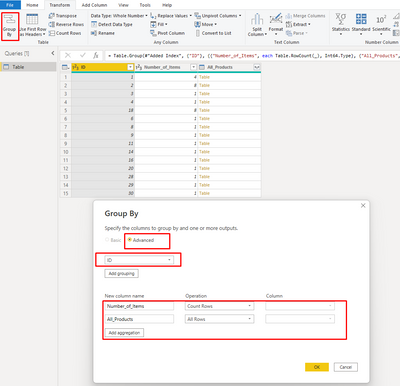
Group rows by ID, or whatever column you want to be the unique identifier
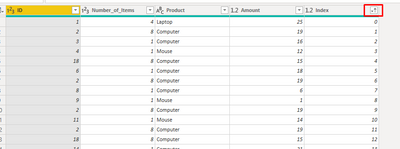
Expand the table, put the index back in order of ascending then you can delete that column
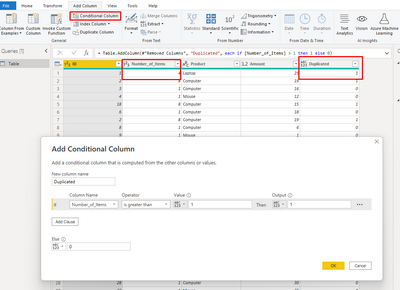
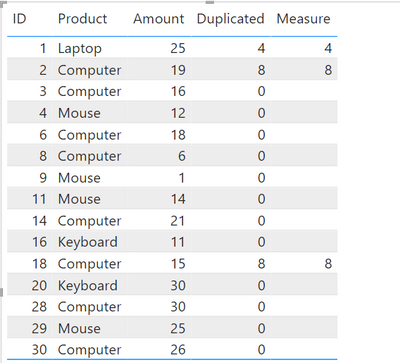
I then added a conditional column called "duplicated" which I would use in a measure
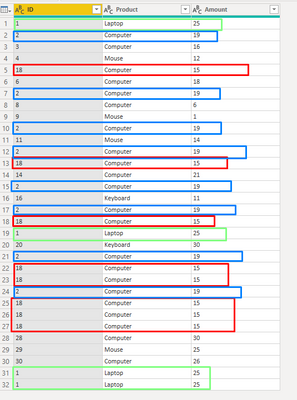
Then I can see how many times each of rows [Product with the same ID] appear in my table.
The measure was
Measure = calculate(COUNTROWS('Table'),FILTER('Table','Table'[Number_of_Items]>1))
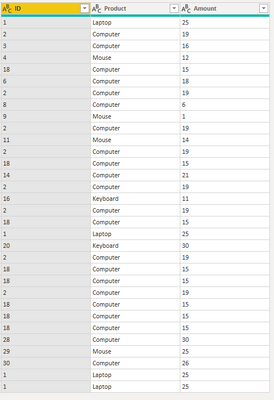
This was my original table:
Hi @Anonymous,
You use Group By to do the count then apply the conditional formula.
Below code is what I combine the codes for both group by and if formula:
Add a custom step:
Table.Group(TableName/PreviousStep, Table.ColumnNames(TableName/PreviousStep), {{"Count", each if Table.RowCount(_) > 1 then 0 else 1 , Int64.Type}}, GroupKind.Local)
Translate:
1. Get all column names from the previous step or a table with Table.ColumnNames(TableName/PreviousStep) ; hence, dynamically pick up all columns.
2. if Table.RowCount(_) > 1 then 0 else 1 , this formula does the count if each row is greater than 1 then 0 else 1
Regards
KT
Hi, hope this helps
In Transform Data:
Add index starting from 0
Group rows by ID, or whatever column you want to be the unique identifier
Expand the table, put the index back in order of ascending then you can delete that column
I then added a conditional column called "duplicated" which I would use in a measure
Then I can see how many times each of rows [Product with the same ID] appear in my table.
The measure was
Measure = calculate(COUNTROWS('Table'),FILTER('Table','Table'[Number_of_Items]>1))
This was my original table:
Hi @Anonymous
Here is a great article by that amazing author, @KenPuls . After you have a count of the duplicates, you can use the conditional column to define no duplicates as 1 or duplicates as 0.
Let me know if you have any questions.
If this solves your issues, please mark it as the solution, so that others can find it easily. Kudos 👍are nice too.
Nathaniel
Proud to be a Super User!
How do we count duplicates?
Hi @Anonymous ,
Sorry, this did not display. https://www.excelguru.ca/blog/2015/12/09/identify-duplicates-using-power-query/ Go here, a pretty quick read, but essentially you use a groupby and then replace all the columns in a second step. You end up with one column that has the count of duplicates. I use this all the time!
Let me know if you have any questions.
If this solves your issues, please mark it as the solution, so that others can find it easily. Kudos 👍are nice too.
Nathaniel
Proud to be a Super User!
If you have recently started exploring Fabric, we'd love to hear how it's going. Your feedback can help with product improvements.
A new Power BI DataViz World Championship is coming this June! Don't miss out on submitting your entry.
Share feedback directly with Fabric product managers, participate in targeted research studies and influence the Fabric roadmap.
| User | Count |
|---|---|
| 6 | |
| 3 | |
| 3 | |
| 3 | |
| 2 |