Join us at FabCon Atlanta from March 16 - 20, 2026, for the ultimate Fabric, Power BI, AI and SQL community-led event. Save $200 with code FABCOMM.
Register now!The Power BI Data Visualization World Championships is back! Get ahead of the game and start preparing now! Learn more
HI,
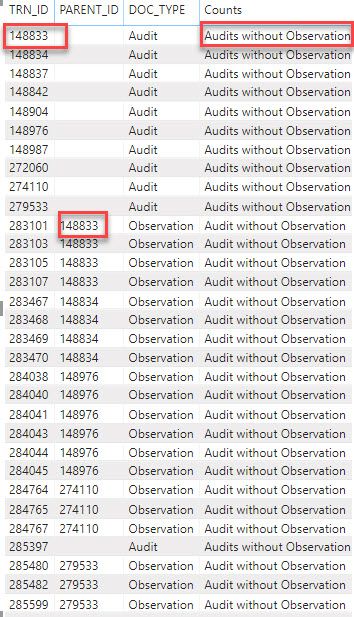
I am comparing 2 columns and displaying the required text in the new column using the specs below.
Solved! Go to Solution.
Hi @kalyan209 ,
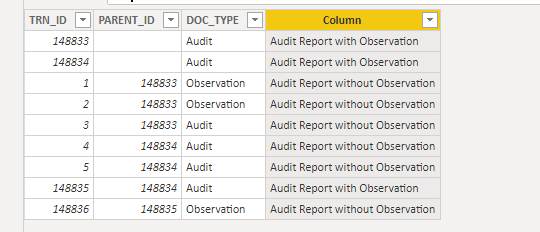
We can create a calculated column as below.
Column =
VAR par =
VALUES ( 'Audit and Obs Data'[PARENT_ID] )
RETURN
IF (
'Audit and Obs Data'[DOC_TYPE] = "Observation",
"Audit Report without Observation",
IF (
'Audit and Obs Data'[DOC_TYPE] = "Audit"
&& 'Audit and Obs Data'[TRN_ID] IN par,
"Audit Report with Observation",
IF (
'Audit and Obs Data'[DOC_TYPE] = "Audit"
&& NOT ( 'Audit and Obs Data'[TRN_ID] IN par ),
"Audit Report without Observation"
)
)
)
For more details, please check the pbix as attached.
Hi @kalyan209 ,
We can create a calculated column as below.
Column =
VAR par =
VALUES ( 'Audit and Obs Data'[PARENT_ID] )
RETURN
IF (
'Audit and Obs Data'[DOC_TYPE] = "Observation",
"Audit Report without Observation",
IF (
'Audit and Obs Data'[DOC_TYPE] = "Audit"
&& 'Audit and Obs Data'[TRN_ID] IN par,
"Audit Report with Observation",
IF (
'Audit and Obs Data'[DOC_TYPE] = "Audit"
&& NOT ( 'Audit and Obs Data'[TRN_ID] IN par ),
"Audit Report without Observation"
)
)
)
For more details, please check the pbix as attached.
The Power BI Data Visualization World Championships is back! Get ahead of the game and start preparing now!
| User | Count |
|---|---|
| 17 | |
| 9 | |
| 9 | |
| 7 | |
| 7 |