cancel
Showing results for 
Search instead for 
Did you mean: 

The Power BI Data Visualization World Championships is back! Get ahead of the game and start preparing now! Learn more

Reply
kalyan209
Frequent Visitor

Comparing 2 columns

HI,


I am comparing 2 columns and displaying the required text in the new column using the specs below.


  • IF Doc Type = Observation THEN “Audit Report without Observation”
  • IF Doc Type = Audit AND TRN ID is in  Parent ID Field THEN “Audit Report with Observation”
  • IF Doc Type =Audit AND  TRN is not in Parent ID Field THEN “Audit Report without Observation”


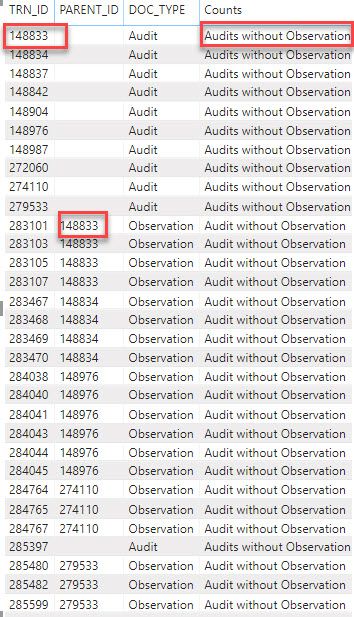
From the image below i need to check if 148833 is present in PARENT_ID and display "Audits with observation". 
The formula i used is: 
 
Counts = IF('Audit and Obs Data'[DOC_TYPE] = "Observation", "Audit without Observation", IF('Audit and Obs Data'[DOC_TYPE]="Audit" && CONTAINS('Audit and Obs Data','Audit and Obs Data'[TRN_ID],'Audit and Obs Data'[PARENT_ID]), "Audit","Audits without Observation"))
2019-12-04_13-57-08.jpg
 
thanks in advance
1 ACCEPTED SOLUTION
v-frfei-msft
Community Support
Community Support

Hi @kalyan209 ,


We can create a calculated column as below.

Column =
VAR par =
    VALUES ( 'Audit and Obs Data'[PARENT_ID] )
RETURN
    IF (
        'Audit and Obs Data'[DOC_TYPE] = "Observation",
        "Audit Report without Observation",
        IF (
            'Audit and Obs Data'[DOC_TYPE] = "Audit"
                && 'Audit and Obs Data'[TRN_ID] IN par,
            "Audit Report with Observation",
            IF (
                'Audit and Obs Data'[DOC_TYPE] = "Audit"
                    && NOT ( 'Audit and Obs Data'[TRN_ID] IN par ),
                "Audit Report without Observation"
            )
        )
    )


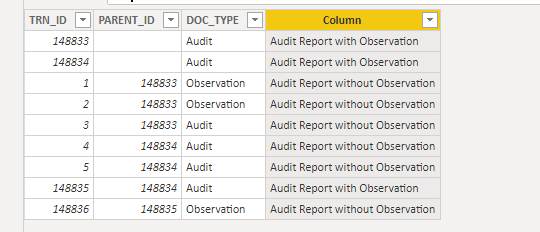
Capture.PNG


For more details, please check the pbix as attached.


Community Support Team _ Frank
If this post helps, then please consider Accept it as the solution to help the others find it more quickly.

View solution in original post

1 REPLY 1
v-frfei-msft
Community Support
Community Support

Hi @kalyan209 ,


We can create a calculated column as below.

Column =
VAR par =
    VALUES ( 'Audit and Obs Data'[PARENT_ID] )
RETURN
    IF (
        'Audit and Obs Data'[DOC_TYPE] = "Observation",
        "Audit Report without Observation",
        IF (
            'Audit and Obs Data'[DOC_TYPE] = "Audit"
                && 'Audit and Obs Data'[TRN_ID] IN par,
            "Audit Report with Observation",
            IF (
                'Audit and Obs Data'[DOC_TYPE] = "Audit"
                    && NOT ( 'Audit and Obs Data'[TRN_ID] IN par ),
                "Audit Report without Observation"
            )
        )
    )


Capture.PNG


For more details, please check the pbix as attached.


Community Support Team _ Frank
If this post helps, then please consider Accept it as the solution to help the others find it more quickly.

Helpful resources

Announcements
Power BI DataViz World Championships

Power BI Dataviz World Championships

The Power BI Data Visualization World Championships is back! Get ahead of the game and start preparing now!

December 2025 Power BI Update Carousel

Power BI Monthly Update - December 2025

Check out the December 2025 Power BI Holiday Recap!

FabCon Atlanta 2026 carousel

FabCon Atlanta 2026

Join us at FabCon Atlanta, March 16-20, for the ultimate Fabric, Power BI, AI and SQL community-led event. Save $200 with code FABCOMM.

Top Solution Authors