cancel
Showing results for 
Search instead for 
Did you mean: 

July 7 - July 17 | Round 2 of the Power BI Dataviz World Championships. Don't miss your chance! Learn more

Reply
Sudheeshp
Frequent Visitor

Compare two cell values

I want to compare two cell values in column 'Unique Customer', and 'Promo ID'.  Unique Customer value can be repeatable,  based on the date, with or without 'Promo ID'.  I like to create a new column looking up entire column of unique Customer.  if any of the unique customer containts Promo Id, I want to tag that Unique Customer as Y.  Please help.  

   This is not in my Excel folder source
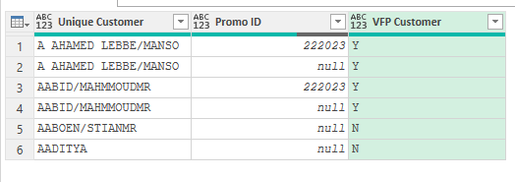
   New Column
Unique CustomerPromo ID VFP Customer
A AHAMED LEBBE/MANSO222023 Y
A AHAMED LEBBE/MANSO  Y
AABID/MAHMMOUDMR222023 Y
AABID/MAHMMOUDMR  Y
AABOEN/STIANMR  N
AADITYA  N
1 ACCEPTED SOLUTION

Just paste the code I have provided in formula bar.

''YourPreviousStepName'' was just a place holder for the previous step in your query.

Jakinta_0-1680547143416.png


Since it has more than 1 word in its name it should be formated as #"Unique Customer".


View solution in original post

4 REPLIES 4
Sudheeshp
Frequent Visitor

Dear Jakinta, 

Much appreciated the help.  

Jakinta
Solution Sage
Solution Sage

You can try with step below after your step/table with columns "Unique Customer" & "Promo ID".


= Table.RemoveColumns ( Table.Combine( Table.Group( Table.DuplicateColumn( YourPreviousStepName, "Promo ID", "Helper"), {"Unique Customer"}, {{"A", each Table.AddColumn (Table.FillDown (Table.FillUp (_, {"Helper"}), {"Helper"}), "VFP Customer", each if [Helper] <> null then "Y" else "N" ), type table }})[A]), "Helper")


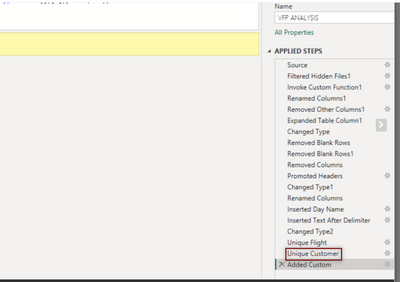
Jakinta_1-1680538157438.png


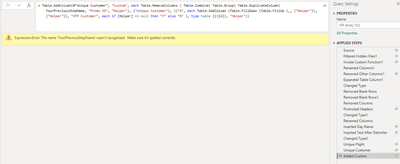
Much appreciated your help.  However please see the error as shown in the photo

Sudheeshp_1-1680538885232.png


Just paste the code I have provided in formula bar.

''YourPreviousStepName'' was just a place holder for the previous step in your query.

Jakinta_0-1680547143416.png


Since it has more than 1 word in its name it should be formated as #"Unique Customer".


Helpful resources

Announcements
FabCon and SQLCon Barcelona 2026

FabCon & SQLCon – Barcelona 2026

Join us in Barcelona for FabCon and SQLCon, the Fabric, Power BI, SQL, and AI community event. Save €200 with code FABCMTY200.

60 days of Data Days Carousel

Data Days 2026

Join Data Days 2026: 60 days of free live/on-demand sessions, challenges, study groups, and certification opportunities.

Power BI DataViz World Championships carousel

Power BI DataViz World Championships - June 2026

A new Power BI DataViz World Championship is coming this June! Don't miss out on submitting your entry.

Top Solution Authors